


vacs (/vɐks/) is an open-source, cross-platform Ground-To-Ground Voice Communication System for VATSIM, meant to provide a seamless coordination experience for virtual air traffic controllers.
We aim to modernize VATSIM controller-to-controller coordination by providing a low-latency and easy-to-use voice communication system.
 |
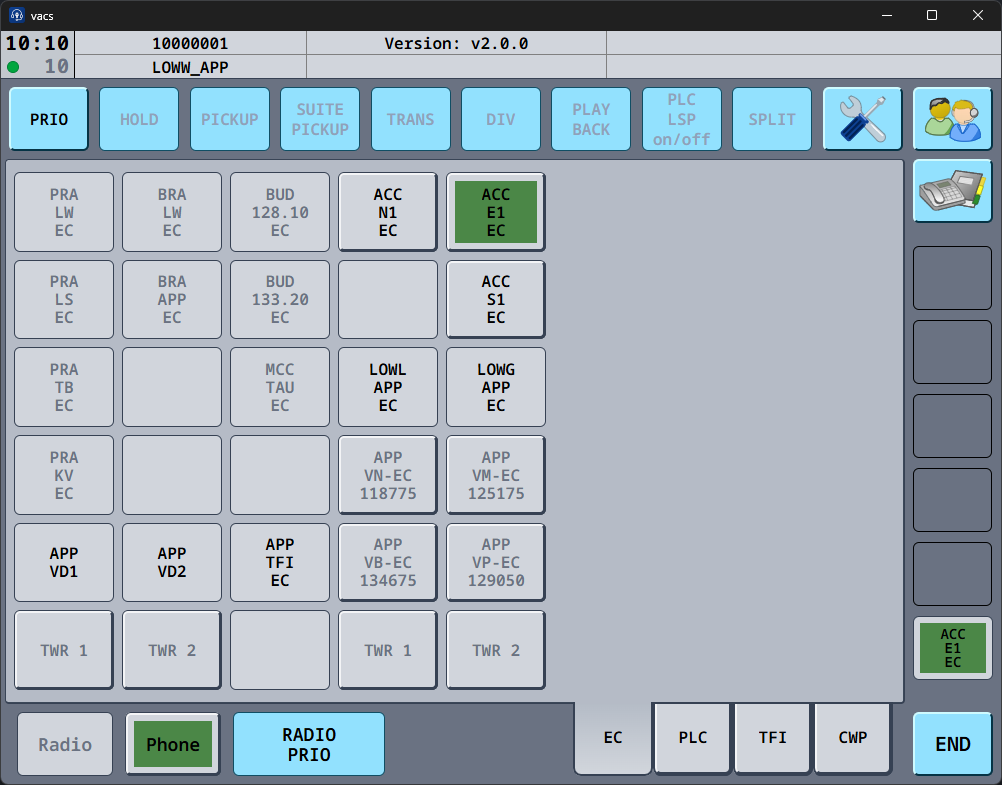 |
| Geo layout with an incoming call | Tabbed layout with an outgoing call |
 |
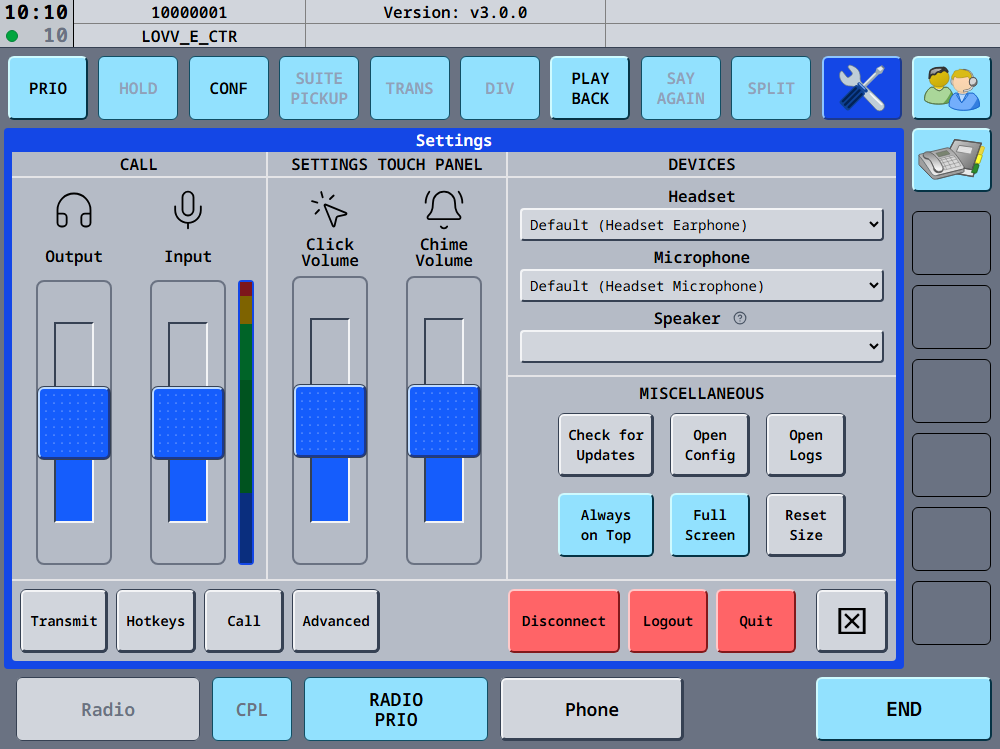 |
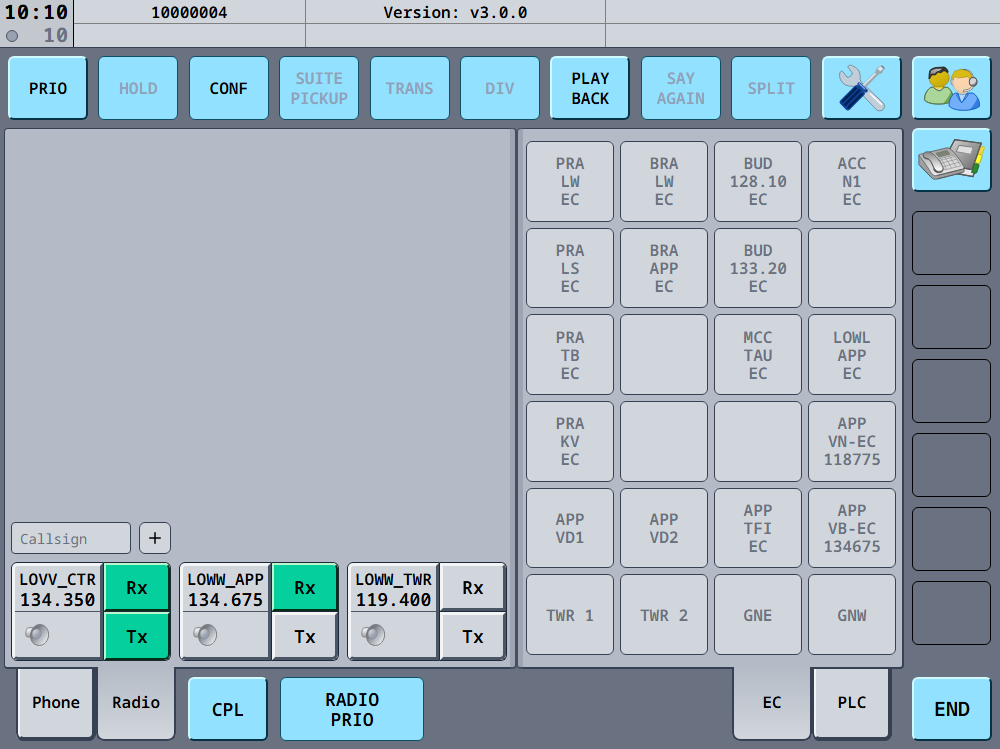
| Split view with the radio integration | Settings |
- High-quality, low-latency voice communication using the Opus codec
- Peer-to-peer audio streaming using WebRTC (no need for a centralized TeamSpeak/Discord or other voice server)
- Simple authentication using VATSIM Connect (no need to provide your VATSIM credentials)
- Sector-based call routing driven by the community-maintained vacs-data dataset, with geo and tabbed layouts per FIR
- Priority calls, conference calls, and a telephone directory for stations outside your layout
- Integration with TrackAudio and Audio For VATSIM, including radio playback
- Remote control of the client from a browser on another device
- Cross-platform desktop client (Windows, Linux, macOS) using Tauri
- UI/UX inspired by real-life equivalents
The vacs user manual covers installing, configuring and using vacs. Good places to start:
- Requirements and Installation
- Initial setup and Making a call
- Known issues & limitations and the FAQ
- Configuration files and the Remote control API
Releases for Windows, Linux (.deb, .rpm, .AppImage) and macOS are available on the releases page. On macOS, you can also install vacs from our Homebrew tap:
brew install --cask vacs-project/tap/vacsAll releases are signed. See release verification for how to check the signatures.
If you encounter any issues or have questions about vacs, please use one of the following channels:
- Bug reports: open an issue on our issue tracker using the
Bug reporttemplate - Feature requests: check out our project status board and open an issue on our issue tracker using the
Feature requesttemplate - Questions & discussions: start a conversation on our discussion forum
- System Status: check our status page for real-time uptime monitoring and incident updates
Please search existing issues and discussions before creating a new one to avoid duplicates.
Tip
Need help or just want to hang out?
If you have questions, need support, or simply feel like chatting, check out our Discord server!
We track planned features, improvements, and known issues in our GitHub Projects board. Feel free to check there for what's coming next or to suggest new features.
tl;dr No audio is recorded, no credentials are stored, and calls are peer-to-peer. Your IP address is visible to call participants.
vacs only processes your VATSIM CID, never your password or other account details. Audio flows directly between call participants and never passes through the signaling server; when a direct connection is impossible, it is relayed through a TURN server operated by the core maintainers. The full Privacy & Data Handling Policy describes what the official servers log and for how long.
The vacs project provides a centralized signaling server (required for establishing calls), so no self-hosting is required. This server is used to track online stations and allow controllers to establish calls with their neighbors.
As such, connecting to the default server is recommended to ensure the best possible reachability across the network.
However, we still provide the required server binaries in the form of a Docker image should you prefer to host your own instance. Note that clients must manually edit their config files to specify your custom server URLs to use it and won't be able to call any other clients connected to the default server.
Note
Docker images for versions before 2.0.0 were published at ghcr.io/morpheusxaut/vacs-server. Starting with 2.0.0, images are published at ghcr.io/vacs-project/vacs-server.
By default, all released vacs clients will connect to the production server located at https://vacs.network (with the WebSocket endpoint available at wss://vacs.network/ws). This server will always run the latest stable version available.
In addition to the production server, we also provide a development server running on https://dev.vacs.network (wss://dev.vacs.network/ws) that can be used to test new changes before deploying them to production. Furthermore, the dev server does not require live VATSIM credentials but uses the VATSIM Connect Sandbox environment and its associated credentials. No active VATSIM connection is required to connect to the dev server.
See CONTRIBUTING.md for setting up a development environment, building the client and server, and running the test suites. Architectural decisions are recorded in docs/decisions, and the release process is described in docs/release-automation.md.
The vacs project is a Rust monorepo containing several crates:
vacs-client: Cross-platform desktop client using Tauri and Preactvacs-server: Axum-based signaling server providing HTTP and websocket APIvacs-protocol: Shared protocol and types between client and servervacs-audio: CPAL audio backend including Opus encoder/decoder, a waveform generator and a basic mixer and DSPvacs-webrtc: WebRTC peer connection abstraction including protocol handlingvacs-signaling: Websocket signaling protocol implementation and abstractionsvacs-vatsim: Various VATSIM-specific client implementations and utilities used by both client and servervacs-macros: Internal macros used by various crates
While these crates were primarily developed to be used in our project's own client, they are also usable independently and aim to provide some abstractions to reduce developer load when implementing a custom client.
The core maintainers are responsible for the project's direction, architecture decisions, release management, and the operation of all infrastructure provided by the vacs project (including the official signaling servers, website, and CI/CD pipelines). While vacs benefits from contributions by all of its community members, the core maintainers hold final decision-making authority on project scope, roadmap, and policy.
The current core maintainers are:
- Luis Kreihsl (@IamLuisAUT, VATSIM CID 1487671)
- Nick Müller (@MorpheusXAUT, VATSIM CID 1461002)
The vacs project and all its crates and packages are dual-licensed as
- MIT License (LICENSE-MIT)
- Apache License, Version 2.0 (LICENSE-APACHE)
at your option.
This means you can choose to use vacs under either the MIT license or the
Apache-2.0 license.
Unless you explicitly state otherwise, any contribution intentionally submitted for inclusion in this project is provided under the same dual-license terms.