Repository navigation
[BUG] Cracking sound from left speaker on Dell XPS 17 9710 #5436
Description

Describe the bug
Everytime I reproduce a sound or video, I can hear a crack from the left speaker, at the begining and at the end of the sound/video, and sometimes, even I cannot hear anything from this left speaker, and I have to flash my laptop bios from windows to reenable sounds from the left speaker. I use debian with the kernel 5.16.x and the latest version of this driver, 1.9.
To Reproduce
Play any videos from youtube.
Reproduction Rate
All the time.
Expected behavior
Both speakers sound clear and without any crack sounds.
Impact
It's very annoying when reproducing any video to hear this sound or even can't hear any sound from the left speaker. The right one works pretty fine.
Environment
Branch name and commit hash of the 2 repositories: sof (firmware/topology) and linux (kernel driver).
Kernel: 5.16.10-1
SOF: 1.9-1
Name of the topology file
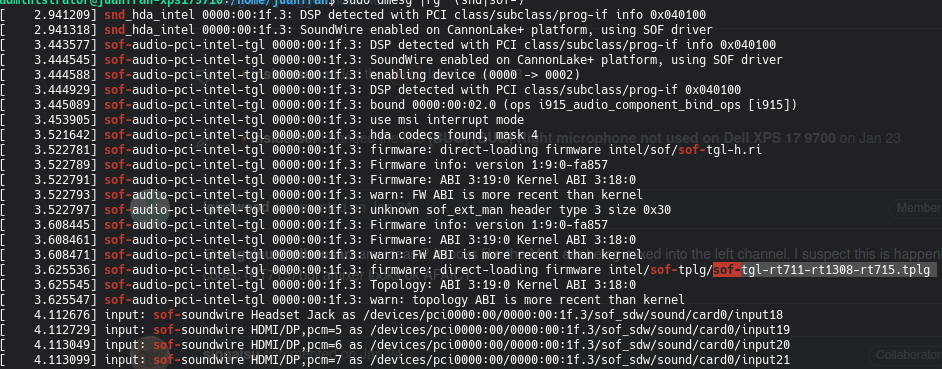
Topology: intel/sof-tplg/sof-tgl-rt711-rt1308-rt715.tplg
Name of the platform(s) on which the bug is observed.
Platform: Dell XPS 17 9710
Screenshots or console output
Activity
plbossart commentedon Feb 25, 2022
@zpecter can you attach the result of 'alsa-info' please, it's not clear to me which SKU this is. I am not aware of any issues reported with speakers not functional.
JuanFcoMiranda commentedon Feb 26, 2022
Yes, of course. Here it is.
alsa-info.txt
And yes, it's pretty weird this behaviour, it only occurs on Linux, while I use Windows I don't have any issues with the speakers or sound. I even have recorded the sound if you need it.
srguglielmo commentedon Feb 28, 2022
I'm having this popping issue as well (along with an inability to get the microphone working, but that's a separate issue).
all-alsa-info.txt
lgirdwood commentedon Feb 28, 2022
@zpecter @srguglielmo for the left speaker popping (and being fixed by the bios, I suspect a codec configuration issue). The codecs are I2C devices and could be programmed by BIOS (SOF FW cant program them). Speakers popping at start/stop is also normal (but undesirable), this usually means the speaker playback audio path is being powered on.
Could you both try using alsamixer to verify L/R channel settings are the same. If the same it looks like we need Realtek to help solve.
@srguglielmo can you check the open bugs for your Mic issue and open a new issue if not found. Thanks.
JuanFcoMiranda commentedon Feb 28, 2022
@lgirdwood is it normal that popping sound only occurs on the left speaker and sometimes it appears this left speaker is disabled and only the right one has sound?
lgirdwood commentedon Feb 28, 2022
You would normally hear the pop on both L & R when the codec and amps are powered on but audio can disguise the pop on the right. Try playing silence e.g.
aplay -f dat /dev/zeroand if you only get a pop on the L then it could mean something to the codec engineers.JuanFcoMiranda commentedon Feb 28, 2022
When I execute that command,
aplay -f dat /dev/zero, I don't hear anything on both speakers.What could be the problem with that popping sound? Could it be a problem with the speaker itself (hardware)?
plbossart commentedon Mar 1, 2022
@zpecter can you confirm what happens if you use
aplay -Dhw:0,2 -f dat /dev/zero
this should play silence on your amplifiers.
if you don't hear a crack or pop, then it might be an issue with a missing ramp when starting playback. If you play a sound without a gradual increase in volume, you might hear a pop. Usually most hardware codecs do implement some sort of solution
@shumingfan Any advice you could give us?
shumingfan commentedon Mar 1, 2022
@zpecter
Please enable the debug log of the rt1308-sdw driver and share the kernel log.
Could you try the patch below?
If you still hear the pop sound, please change the setting like below.
regmap_write(rt1308->regmap, 0xc370, 0x24);
or
regmap_write(rt1308->regmap, 0xc370, 0x34);
JuanFcoMiranda commentedon Mar 1, 2022
Hi, when I execute that command, I don't hear anything on both speakers.
JuanFcoMiranda commentedon Mar 1, 2022
How do I do that?
plbossart commentedon Mar 1, 2022
@zpecter you have to compile the kernel yourself, using e.g. the instructions provided here: https://thesofproject.github.io/latest/getting_started/setup_linux/install_locally.html
from the details above you seem to be using linux-stable, you would need to add the patch above on top of that tree.
If you are not familiar with kernel stuff it's going to be difficult for us to provide support given that we don't have access to your specific hardware.
JuanFcoMiranda commentedon Mar 2, 2022
@plbossart, I'm familiar with compiling kernel, but it's been a long time since I compile my own kernel for the last time, but I meant how to enable the debug log for the driver.
shumingfan commentedon Mar 3, 2022
@zpecter You could refer to the website (https://01.org/linuxgraphics/gfx-docs/drm/admin-guide/dynamic-debug-howto.html#debug-messages-at-module-initialization-time).
3 remaining items
JuanFcoMiranda commentedon Mar 7, 2022
Hi, yes, I hope this 3 files are what you are asking for:
messages.txt
registers1.txt
registers2.txt
I have used kernel 5.16.12, downloaded from kernel.org.
Greetings.
shumingfan commentedon Mar 9, 2022
@zpecter I got the Dell XPS 17 9710. I installed the Ubuntu OS and tried to duplicate this issue on it.
Unfortunately, I can't duplicate this issue.
Even I changed the system to the same kernel version and SOF FW version.
alsa-info-2022.03.09.txt
I would like to check the debug message of rt1308-sdw driver.
I can't see the debug log in the messages.txt you dumped.
Please enable the debug log and dump the kernel log again.
Could you try to play a WAV file and check the issue still exists?
$ aplay -D plughw:0,2 filename.wav
JuanFcoMiranda commentedon Mar 9, 2022
Hi, I use Debian, and maybe there is something different. I'll try that version an check if the issue is there.
I have tried a wav file and I still can hear the sound. I have attached an audio file so you can check it.
New Recording 12.zip
Let's see if this file contains the logs:
messages.txt
Thank you very much.
shumingfan commentedon Mar 10, 2022
@zpecter Our HW engineer wants to test the 1K tone wav file and record the sound again.
1Ktone_48Khz_16b.zip
I have another patch, please check below.
shumingfan/linux@2c0cb55
Would you please test on your side?
Please enable the debug log and share the kernel log.
JuanFcoMiranda commentedon Mar 10, 2022
Hi @shumingfan, I have been testing the patch for a few hours, and it seems the pop sound is gone.
I tried a lot of different videos on different sources, youtube, vimeo, etc, and some local videos and mp3 files and I don't hear the sound now.
Thank you very much
plbossart commentedon Mar 10, 2022
The patch makes sense to me @shumingfan, i think it's better to play with registers on DAPM events than when the amplifier is initialized when the SoundWire bus starts.
shumingfan commentedon Mar 11, 2022
@zpecter Thanks for the testing.
Could you please help to do another test that removes the delay time?
The part of the patch below is the delay time when power-on. Please remove this line and test again.
Please share the kernel log to confirm the calibration parameters.
@plbossart I think the root cause should be the calibration parameters loading issue.
The PVDD power doesn't be ready when the driver does the io_init function.
The PVDD affects the calibration parameters loading from EFUSE. However, I don't know where the PVDD is controlled.
JuanFcoMiranda commentedon Mar 11, 2022
Hi @shumingfan, I deleted that line, but I had some problems, not related with the patch but with the latest bios by Dell.
Beside the problem with the bios update, which I could not hear anything on the left speaker nor on Linux nor Windows, it still works fine, and the issue seems to be gone.
Here are the logs:
messages.txt
Thank you very much again.
shumingfan commentedon Mar 14, 2022
@zpecter I can't see any log of rt1308 in the messages.txt.
Could you check the debug log enables or not?
Sorry, I'm not sure about the different settings between the old bios and new bios.
I suspect that one rt1308 as the left speaker doesn't be presented in the APCI.
JuanFcoMiranda commentedon Mar 14, 2022
Hi, sorry. Let's see if this has the logs:
messages.txt
I have used this command:
This one is with the latest bios installed, 1.7.2.
shumingfan commentedon Mar 15, 2022
@zpecter Thanks. I will send the patch to upstream.
plbossart commentedon Mar 16, 2022
Thanks @zpecter for reporting this and @shumingfan for taking the time to fix this, nice job.
JuanFcoMiranda commentedon Mar 18, 2022
Yes, great job @shumingfan, and thank you for your time.
I think there is another weird bug, but it's not related to this one, the popping sound is gone, but when I change from Linux to Windows sometimes the left speaker does not emit any sound and I have to flash the bios to repair it.
shumingfan commentedon Mar 21, 2022
@zpecter I think you could report the new issue to https://github.com/thesofproject/linux.
It should check the ACPI first between old and new bios.