Repository navigation
Encountering timeout errors in GitHub Actions I don't see locally #46
Description

Here's a recent call that hung for 360 minutes before being killed by GitHub. I'm unclear of the cause.
Here's a recent call that hung for 360 minutes before being killed by GitHub. I'm unclear of the cause.
Activity
palewire commentedon Mar 21, 2022
I think this could be something besides a timeout. I added a shorter timeout method in #47 and then tried a site that's caused problems in interactive mode.
The page loads. I hit enter in the terminal to approve the screenshot. It still hangs.
It's hanging right there, with the window open and a blank line after the enter in the term forever. My hunch is there must be some event in playwright that isn't firing. Not sure yet though. Any help would be appreciated.
palewire commentedon Mar 21, 2022
Here's the console log from that site. It's a news site, so it's full of errors, of course.
ktla.com-1647887063269.log
palewire commentedon Mar 21, 2022
Here are the errors.
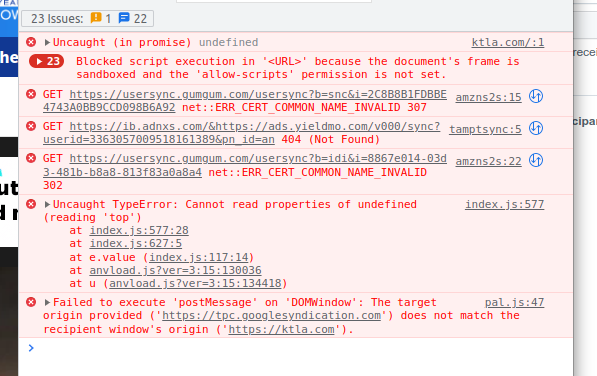
palewire commentedon Mar 21, 2022
After adding some click.echo logs to the cli file and repeated testing, I'm fairly confident that the problem isn't with the page load but is instead somewhere inside the
page.screenshot()method.palewire commentedon Mar 21, 2022
This may be related microsoft/playwright#9757
simonw commentedon Mar 21, 2022
I agree, having a default timeout feels like the right thing to do here. Can give people an option to turn that timeout off if they really don't want it for some reason.
palewire commentedon Mar 21, 2022
Fun fact: I just downgraded to playwright version 1.14.1 as recommended in microsoft/playwright#9757 and the site above worked immediately, after failing 10 times before.
simonw commentedon Mar 21, 2022
To clarify, this bug occurs even with your new timeout mechanism from this PR?
palewire commentedon Mar 21, 2022
Yes. It appears to be an issue deeper inside the screenshot method, after the page has finished loading.
simonw commentedon Mar 21, 2022
Since this looks to be a Playwright bug I'm inclined not to work around it at a code level, but instead to describe a workaround in the documentation.
Have you tried setting a time limit on the GitHub Actions step that takes the screenshot? Something like this should be pretty reliable I would hope:
It looks like you started doing that four hours ago: palewire/news-homepages@8be4300
palewire commentedon Mar 21, 2022
palewire commentedon Mar 22, 2022
With the pinned version fixing the issue on my end, I am going to withdraw this issue. Thanks for your help.