Repository navigation
osx filesystem writes are not always guaranteed to match requested casing #25469
Description

Version: 10.12.0
Platform: Darwin m-c02x6042jgh7 18.2.0 Darwin Kernel Version 18.2.0: Mon Nov 12 20:24:46 PST 2018; root:xnu-4903.231.4~2/RELEASE_X86_64 x86_64
problem
- fs.writeFile isn't guaranteed to match the requested filename casing.
example:
fs.writeFile('/path/to/Thing.js', ...)may generate/path/to/Thing.js, but, a subsequent process that runsfs.writeFile('/path/to/thing.js', ...)may generate/path/to/Thing.js, instead of/path/to/thing.js
this occurs when writing a file that does not exist, but previously existed in different casing.
reproduction
it's tricky. i've tried--but i cannot generate a set of reliable conditions that induces the failure.
i've observed this twice in the wild now, on two different OSX machines.
- 1st was back in 2017, where i thought the fault was with nyc, as seen in Old removed files seem to stay cached in reports istanbuljs/nyc#644
- 2nd was today, in typescript, as shown in this live demonstration: https://www.youtube.com/watch?v=bS50DmFZCJw&feature=youtu.be
i'm not 100% convinced it's even a node bug--it could very well be an OSX issue. i found that restarting my system resolved one occurrence of the failure, but not all.
sorry that i cannot reproduce reliably. however, it's the repeatability of which is in fact the problem that i am reporting! :)
Activity
devsnek commentedon Jan 13, 2019
If the file already exists with a different casing, that casing will be used. MacOS filesystems are case insensitive by default.
Trott commentedon Jan 13, 2019
This is the way the default case-insensitive macOS filesystem works and doesn't have anything to do with Node.js. AFAIK, you will get the same result using any other programming language or the shell CLI:
Trott commentedon Jan 13, 2019
I'm going to close this but feel free to re-open or comment if there's a subtlety I'm missing here. Thanks!
cdaringe commentedon Jan 13, 2019
there is a subtlety missing in both above assessments. The file no longer exists. I'm writing a non-existent file, and the newly flushed file uses an old file name. The issue is not that Mac OS is generally case insensitive, it's that old filenames are being recycled when they should not be
cdaringe commentedon Jan 13, 2019
Sorry, I should have made that more clear in the problem description. The referenced YouTube video shows it very clearly
devsnek commentedon Jan 13, 2019
@nodejs/fs could this be the realpath cache?
i tried to think of ways to reproduce this but couldn't come up with anything
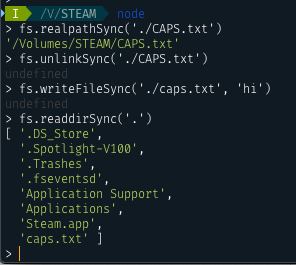
thefourtheye commentedon Jan 16, 2019
Looping in @nodejs/libuv as well.
thefourtheye commentedon Jan 16, 2019
Also /ping @nodejs/platform-macos
bnoordhuis commentedon Jan 22, 2019
@cdaringe Do you have any further info? This appears to be a heisenbug?
cdaringe commentedon Jan 22, 2019
Ya it's bonkers. I don't have any more info. I understand that it's a fools errand to try and troubleshoot it with such little reproducibility, but at least the failure holds for sufficiently long enough sessions to be captured on video (re: YouTube post). It might still be failing on my other box. I'll check, and if it is, I can run whatever-diagnostic we may see fit
gireeshpunathil commentedon Jan 4, 2020
fwiw, tried with this test case (on an assumption that it truly represents the problem statement) on multiple node versions, but did not see it throwing:
cdaringe commentedon Jan 4, 2020
really does seem to be. hasn't happened to me for all of 2019.
let's close and re-open if it occurs again.