Repository navigation
tsc ignores errors in an .mjs module with the same name as an .mts module #47796
Description

Bug Report
tsc incorrectly ignores type errors in an .mjs module if there is a sibling .mts module with the same name.
🔎 Search Terms
- esm
- mjs
- mts
- sibling
- tsc
- errors
🕗 Version & Regression Information
typescript@4.6.0-dev.20220207
⏯ Playground Link
How do you setup a multiple module project in the TypeScript online playground?
💻 Code
package.json:
{
  "name": "tsc-missing-errors-demo",
  "private": true,
  "devDependencies": {
    "typescript": "^4.6.0-dev.20220207"
  },
  "scripts": {
    "types": "tsc -p jsconfig.json"
  }
}jsconfig.json:
{
  "compilerOptions": {
    "module": "node12",
    "noEmit": true,
    "strict": true
  },
  "typeAcquisition": {
    "enable": false
  }
}
.vscode/settings.json
{
  "typescript.disableAutomaticTypeAcquisition": true,
  "typescript.enablePromptUseWorkspaceTsdk": true,
  "typescript.tsdk": "node_modules/typescript/lib"
}a.mjs:
// @ts-check

/** @typedef {import("a").default} A */a.mts:
import b from "b";Run in Terminal (after npm install):
npm run types
🙁 Actual behavior
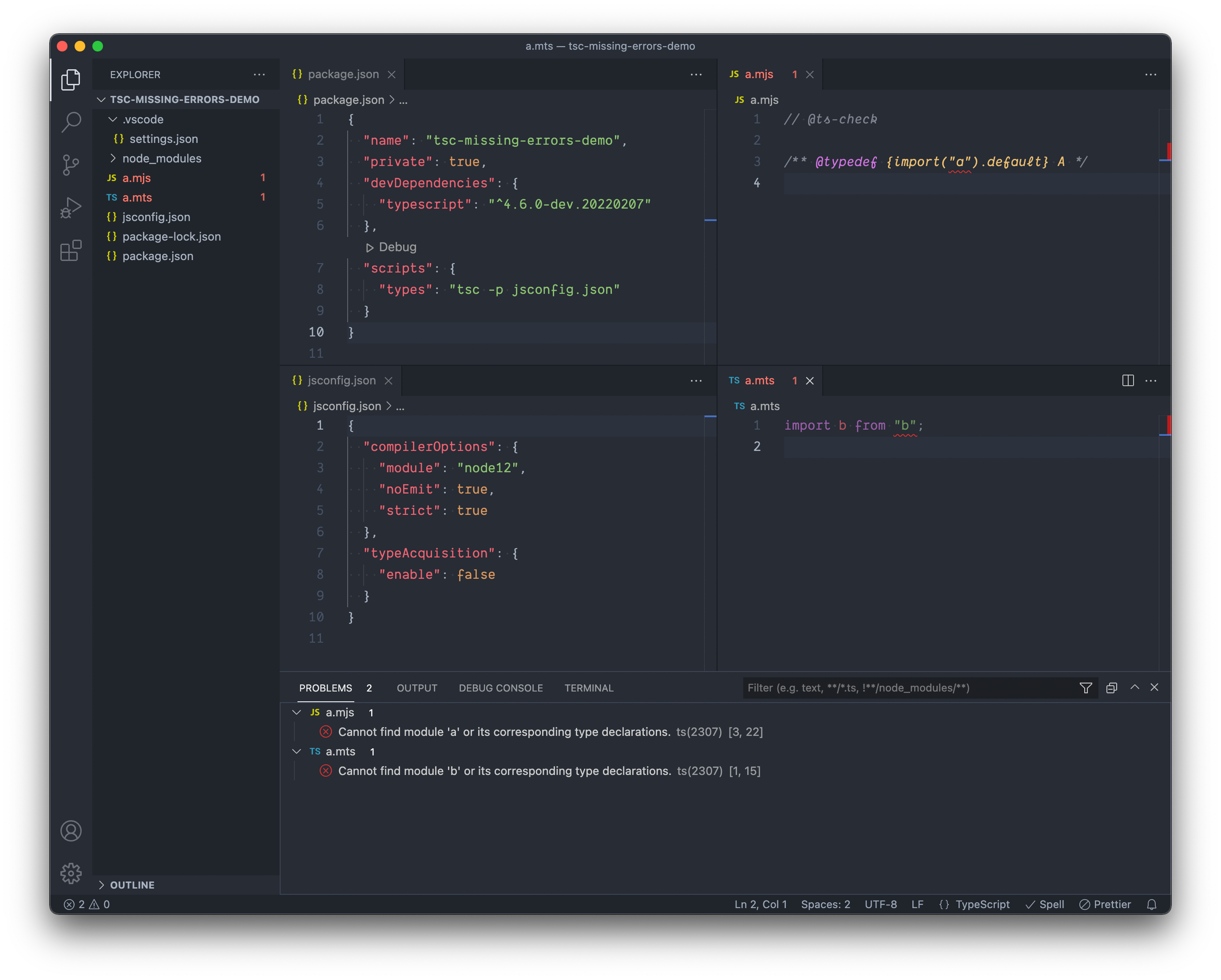
The VS Code editor correctly shows the TypeScript type errors in both a.mjs and a.mts:
The tsc CLI only shows the a.mts error, and incorrectly ignores the error in a.mjs.
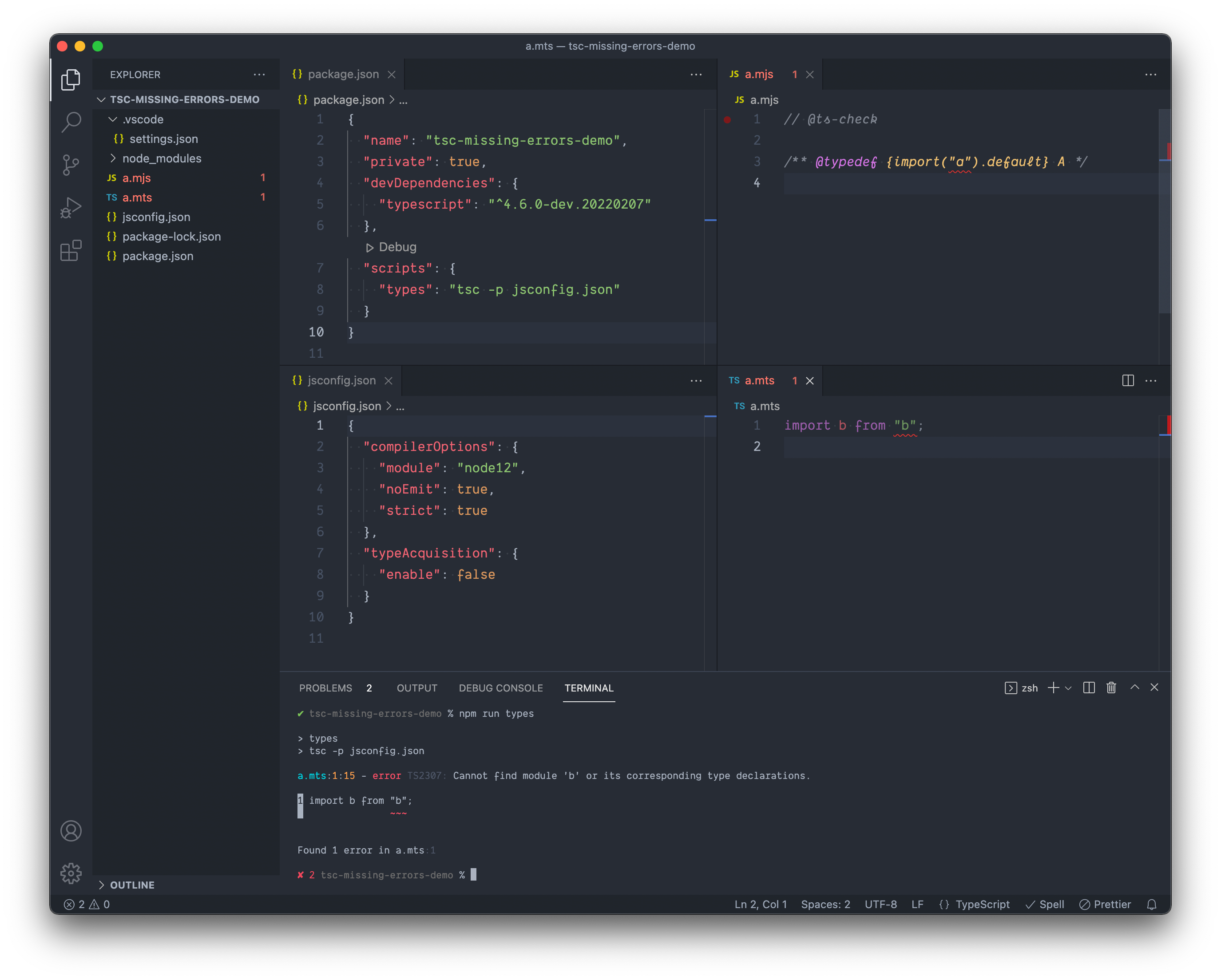
It doesn't matter if the sibling .mts file with the same name has an error or not; just it's presence causes errors in the .mjs file to be hidden:

🙂 Expected behavior
The tsc CLI should display all TypeScript type errors in project modules, regardless if any have the same name as a sibling with a different extension.
Activity
MartinJohns commentedon Feb 8, 2022
This is working as intended. The JavaScript file is considered a build artifact of the TypeScript file, it's just output.
jaydenseric commentedon Feb 8, 2022
But
a.mjsis not a build artifact, and TypeScript shouldn't assume that it is. All of my type safe TypeScript v4.6-dev.x supporting packages have zero build step; I write by hand the exact.mjsand.mtsmodules I want to publish in packageexports. Both types of modules contain types (via JSDoc comments for.mjs) that need to be type checked as I'm editing them via VS Code and in GitHub Actions CI via thetscCLI.The project
jsconfig.jsonhascompilerOptions.noEmitconfigured totrueand even if the project did have a build step, why wouldtscassume thea.mjsfile came from the siblinga.mtsfile? Builds can be configured to place the compiled files anywhere. Within.mjsand.mtsmodules ESM import paths must specify the file extensions, so the files being siblings has no special meaning as no tools should ever be trying to resolve one or the other from extensionless import paths.The sibling
a.mjsanda.mtsmodules both being published package exports is not a particularly exotic approach; for examplea.mjscould be for browser projects to deep import anda.mtsfor Deno projects to deep import. Both need to be type checked independently and could have quite different contents.Even if I am mistaken about any of the above, why would VS Code show type errors in
a.mjs, if it's just a "build artifact" and should be ignored for type checking? VS Code has all the same config and information that thetscCLI has yet they disagree on the errors, so surely there is a bug somewhere here.jaydenseric commentedon Feb 8, 2022
Out of curiosity, I tried configuring
compilerOptions.outDirto"dist"injsconfig.json, sotscshould definitely know thata.mjsis not an artifact of the siblinga.mtsyet still the bug persists; any type errors ina.mjsare ignored by thetscCLI.jaydenseric commentedon Feb 8, 2022
Ok, so
compilerOptions.outDir(after removingcompilerOptions.noEmit) doesn't apparently do anything withinjsconfig.json, but it does withtsconfig.json.With this
tsconfig.json:{ "compilerOptions": { "allowJs": true, "checkJs": true, "module": "Node12", "strict": true, "outDir": "dist" }, "typeAcquisition": { "enable": false } }And with the package
typesscript updated totsc -p tsconfig.jsonthedistfolder is created, but with onlya.mjsin it derived from thea.mtsfile. It still doesn't report any of the sourcea.mjsmodule type errors; it seems to totally skip it. What would be more intuitive is if botha.mjsanda.mtswere processed like normal, but then whatever one is processed second overwrites the first compileda.mjsin thecompilerOptions.outDir. That way you get type check error feedback for both. Certainly ifcompilerOptions.noEmitistruethen both should be type checked; the primary use case for that is to type check all the project modules.It would be great if TypeScript had a simple
check-typescommand that totally avoids compiling modules and friction such as this.Side note; but
node12(lowercased) is a documented valid value forcompilerOptions.module:Yet VS Code warns this is invalid, and suggests
Node12(uppercased):Only for
tsconfig.jsonthough; VS Code is happy withnode12withinjsconfig.json:weswigham commentedon Feb 8, 2022
Explicitly list your input
filesif you actually want to include both - the compiler only automatically pulls in one copy of a file with the same basename (the most TS-y one). (Do note, this will cause other issues like the compiler warning you that they share an emit path if you have emit one!)