You signed in with another tab or window. Reload to refresh your session.You signed out in another tab or window. Reload to refresh your session.You switched accounts on another tab or window. Reload to refresh your session.Dismiss alert
{{ message }}
Repository navigation
NotEnoughMemoryException while publishing "long" msg #187
Hi, I'm trying to publish long massages (Images) with micro-ros. I received this error: terminate called after throwing an instance of 'eprosima::fastcdr::exception::NotEnoughMemoryException' what(): Not enough memory in the buffer stream Aborted (core dumped)
I checked the meaning and according to eProsima it means that my msg buffer memory is too small.
The buffer default is very small, I tried to publish a string and got the error for string longer than 2 characters.
How can I increase the buffer size?
Hello @DorBenHarush, please can you put here a list of command and/or code to reproduce this issue?
FastCDR is not used in micro-ROS firmware so I'm not understanding something here.
Please let us replicate this issue by providing a comprehensive guide to follow your steps.
Hi, @pablogs9 this is the code that generates the error. It works if the string is empty or for short strings like "Hi".
I used the normal commands for configure, build and flash (esp32).
CODE:
Hi @pablogs9 , I'm trying to publish an Image massage and I have some questions. when I try to publish the full image the publisher returns 1 , so I reduced the size to several times and it worked with 800 bytes. Do you know why?
secondly I couldn't publish from inside the timer callback only from main.
Regards,
Dor.
CODE:
#include<esp_event_loop.h>#include<esp_log.h>#include<esp_system.h>#include<nvs_flash.h>#include<sys/param.h>#include<string.h>#include<stdio.h>#include<unistd.h>#include<rcl/rcl.h>#include<rcl/error_handling.h>#include<sensor_msgs/msg/image.h>#include<rclc/rclc.h>#include<rclc/executor.h>#include"freertos/FreeRTOS.h"#include"freertos/task.h"#include"boards.h"#defineSTRING_CAPACITY 20
staticconstchar*TAG="example:take_picture";
#defineRCCHECK(fn) { rcl_ret_t temp_rc = fn; if((temp_rc != RCL_RET_OK)){printf("Failed status on line %d: %d. Aborting.\n",__LINE__,(int)temp_rc);vTaskDelete(NULL);}}
#defineRCSOFTCHECK(fn) { rcl_ret_t temp_rc = fn; if((temp_rc != RCL_RET_OK)){printf("Failed status on line %d: %d. Continuing.\n",__LINE__,(int)temp_rc);}}
rcl_publisher_tpublisher;
sensor_msgs__msg__Image*msg;
camera_fb_t*pic;
staticcamera_config_tcamera_config= {
.pin_pwdn=CAM_PIN_PWDN,
.pin_reset=CAM_PIN_RESET,
.pin_xclk=CAM_PIN_XCLK,
.pin_sscb_sda=CAM_PIN_SIOD,
.pin_sscb_scl=CAM_PIN_SIOC,
.pin_d7=CAM_PIN_D7,
.pin_d6=CAM_PIN_D6,
.pin_d5=CAM_PIN_D5,
.pin_d4=CAM_PIN_D4,
.pin_d3=CAM_PIN_D3,
.pin_d2=CAM_PIN_D2,
.pin_d1=CAM_PIN_D1,
.pin_d0=CAM_PIN_D0,
.pin_vsync=CAM_PIN_VSYNC,
.pin_href=CAM_PIN_HREF,
.pin_pclk=CAM_PIN_PCLK,
//XCLK 20MHz or 10MHz for OV2640 double FPS (Experimental)
.xclk_freq_hz=20000000,
.ledc_timer=LEDC_TIMER_0,
.ledc_channel=LEDC_CHANNEL_0,
.pixel_format=PIXFORMAT_YUV422, //YUV422,GRAYSCALE,RGB565,JPEG
.frame_size=FRAMESIZE_QQVGA, //QQVGA-UXGA Do not use sizes above QVGA when not JPEG
.jpeg_quality=12, //0-63 lower number means higher quality
.fb_count=1//if more than one, i2s runs in continuous mode. Use only with JPEG
};
voidtimer_callback(rcl_timer_t*timer, int64_tlast_call_time)
{
UNUSED(last_call_time);
if (timer!=NULL) {
}
}
staticesp_err_tinit_camera()
{
//initialize the cameraesp_err_terr=esp_camera_init(&camera_config);
if (err!=ESP_OK)
{
ESP_LOGE(TAG, "Camera Init Failed");
returnerr;
}
returnESP_OK;
}
voidappMain(void*arg)
{
init_camera();
rcl_allocator_tallocator=rcl_get_default_allocator();
rclc_support_tsupport;
msg=sensor_msgs__msg__Image__create();
// create init_optionsRCCHECK(rclc_support_init(&support, 0, NULL, &allocator));
// create nodercl_node_tnode=rcl_get_zero_initialized_node();
RCCHECK(rclc_node_init_default(&node, "freertos_picture_publisher", "", &support));
// create publisherRCCHECK(rclc_publisher_init_default(
&publisher,
&node,
ROSIDL_GET_MSG_TYPE_SUPPORT(sensor_msgs, msg, Image),
"freertos_picture_publisher"));
// create timer,rcl_timer_ttimer=rcl_get_zero_initialized_timer();
constunsigned inttimer_timeout=1000;
RCCHECK(rclc_timer_init_default(
&timer,
&support,
RCL_MS_TO_NS(timer_timeout),
timer_callback));
// create executorrclc_executor_texecutor=rclc_executor_get_zero_initialized_executor();
RCCHECK(rclc_executor_init(&executor, &support.context, 1, &allocator));
unsigned intrcl_wait_timeout=1000; // in msRCCHECK(rclc_executor_set_timeout(&executor, RCL_MS_TO_NS(rcl_wait_timeout)));
RCCHECK(rclc_executor_add_timer(&executor, &timer));
//takes picture in yuv422 formatpic=esp_camera_fb_get();
//set height, width, step and is_bigedianmsg->height=pic->height;
msg->width=pic->width;
msg->is_bigendian=0;
msg->step=pic->width*2;
//set pixel format and frame idchar*encoding="yuv422";
msg->encoding.data= (char*)heap_caps_malloc(strlen(encoding) +1, MALLOC_CAP_8BIT);
msg->header.frame_id.capacity=STRING_CAPACITY;
memset(msg->encoding.data, 0, strlen(encoding) +1);
memcpy(msg->encoding.data, encoding, strlen(encoding));
msg->encoding.size=strlen(encoding) +1;
char*frame_id="AI_thinker_image";
msg->header.frame_id.data= (char*)heap_caps_malloc(strlen(frame_id) +1, MALLOC_CAP_8BIT);
msg->header.frame_id.capacity=STRING_CAPACITY;
memset(msg->header.frame_id.data, 0, strlen(frame_id) +1);
memcpy(msg->header.frame_id.data, frame_id, strlen(frame_id));
msg->header.frame_id.size=strlen(frame_id) +1;
//allocate memory for datamsg->data.data= (uint8_t*)heap_caps_malloc(pic->len, MALLOC_CAP_8BIT);
msg->data.capacity=pic->len;
msg->data.size=1000;//msg->step * pic->height ;printf("copying data...\n");
memcpy(msg->data.data, pic->buf, pic->len);
if(msg->data.data==NULL){
printf("failed to allocate memory. restating in 5 sec.\n");
vTaskDelay(5000 / portTICK_RATE_MS);
esp_restart();
}
//msg->header.stamp ?printf("height: %d \n", msg->height);
printf("width: %d \n", msg->width);
printf("pixel format %s \n", msg->encoding.data);
printf("is bigendian %d \n", msg->is_bigendian);
printf("picture step %d \n", msg->step);
printf("frame id %s \n", msg->header.frame_id.data);
printf("buffer length %d \n", msg->data.size);
printf("pic->len %d \n", pic->len);
while(1){
rclc_executor_spin_some(&executor, 1000);
usleep(100000);
//publish pictureprintf("publisher return value: %d \n", rcl_publish(&publisher, msg, NULL));
vTaskDelay(1000 / portTICK_RATE_MS);
}
// free resourcesRCCHECK(rcl_publisher_fini(&publisher, &node))
RCCHECK(rcl_node_fini(&node))
heap_caps_free(msg->encoding.data);
heap_caps_free(msg->header.frame_id.data);
heap_caps_free(msg->data.data);
sensor_msgs__msg__Image__destroy(msg);
vTaskDelete(NULL);
}
You are setting capacity to STRING_CAPACITY but the real capacity is the memory that you have allocated, which is based in strlen().
You are setting msg->data.size = 1000 but you are copying pic->len bytes, here you should set the capacity to the length of the memory that you are allocating and the size to the actual size of the byte array that you are copying. Also, I think that it should be checked if the size is less than the capacity.
I guess that the msg->data.data == NULL check should be done just after the memory allocation because allocation can fail and you are setting memory before checking the correctness of the allocation.
There are some other important points to take into account when dealing with big messages. First of all, you should be aware that the default MTU for the UDP packages that the micro-ROS middleware sends is 512 Bytes. The middleware also has a "historic" which is by default 4. So, the internal middleware layer uses a buffer (from static memory) of 512x4 = 2048 Bytes. Check this for more info
Whit that said, you have to be aware that if you are using a reliable publisher (rclc_publisher_init_default()) and the message length is greater than the MTU, it will be fragmented into the "historic" slots available. In the other case, if you are using best effort publisher (rclc_publisher_init_best_effort()) the message length must be less than the MTU.
So, it is important to know the maximum size of your messages, and then you can configure the RMW in the colcon.meta file of your application. See a sample here.
If you want to tune your RMW buffers for publication it should looks like:
Take care of the formatting of this JSON, it often fails just because of an error in a comma.
You have here two options:
Increase the MTU, so the client will send bigger packages to the agent
Increase the history, so the client will have more available "historic" slots to fragment you whole message into 512 chunks that will be sent to the agent
I changed the parameters as you suggested but it didn't work. Furthermore, I found out that my defaults were 512 and 1.
800 bytes msg works with 512 and 1 so I don't know what the problem is.
800 Bytes works with 512 Bytes of MTU and 1 RMW_UXRCE_STREAM_HISTORY? So, I have not understood the problem... Is your client publishing? Can you receive data using ros2 topic echo ...?
One more thing, when you modify the colcon.meta file are you cleaning all builds?
Usually when modifying the micro-ROS configuration you have to do:
ros2 run micro_ros_setup build_firmware.sh clean #clean is only valid for the ESP32 port
ros2 run micro_ros_setup configure_firmware.sh [config]
ros2 run micro_ros_setup build_firmware.sh
You can check if your changes has been effective looking: include/rmw_microxrcedds_c/config.h and include/uxr/client/config.h
please make sure that in those files you see the values that you have set in your colcon.metas
I checked files and the values didnt change even after doing the steps you mentioned, so I chnaged the values inside include/rmw_microxrcedds_c/config.h and include/uxr/client/config.h
to make sure that values are correct and it didnt work.
These files are not intended to be modified, please try to rebuild all from scratch and modify the colon.metas just before the creation step in order to generate these headers correctly.
I'm going to check why they are not being modified following the step I wrote above.
It didnt work.
This is my workflow:
create_firmware -> add camera app and extensions(Kproject) -> configure camera as app to run -> menuconfig & building -> flash
25.9:
Hi @pablogs9, Do you know why the config.h files only half correct?
Hello @DorBenHarush, I just have tested it in the ESP32 check the last commit. Well if the image es 120x160 pixels and we have 2 B per pixel this makes a message of approx 38400 bytes, if the MTU by default is 512 B we need an XRCE historic greater than 75. You can see this configuration here.
Due to your question, we have found an issue (we are currently investigating) in the middleware handling of fragmentation. So I would like you to test a specific branch with the fix. Having a micro-ROS workspace you can use this fix branch with:
cd firmware/mcu_ws/eProsima/Micro-XRCE-DDS-Client
git checkout fix/fragments_available
Using this app with the fix/fragments_available branch of the Micro XRCE-DDS Client middleware I have this:
You can see the agent receiving and publishing the topic data, the ESP32 console output with publisher return value: 0 and a ros2 topic hz /freertos_image_publisher at 1 Hz.
Because your JSON is malformed, check the ending comma in args:
"names": {
"rmw_microxrcedds": {
"cmake-args": [
"-DRMW_UXRCE_MAX_NODES=1",
"-DRMW_UXRCE_MAX_PUBLISHERS=1",
"-DRMW_UXRCE_MAX_SUBSCRIPTIONS=0",
"-DRMW_UXRCE_MAX_SERVICES=0",
"-DRMW_UXRCE_MAX_CLIENTS=0",
"-DRMW_UXRCE_MAX_HISTORY=12"<- here you had a comma
]
},
"microxrcedds_client": {
"cmake-args": [
"-DUCLIENT_UDP_TRANSPORT_MTU=4096"<- here you had a comma
]
}
}
}
Activity
pablogs9 commentedon Sep 7, 2020
Hello @DorBenHarush, please can you put here a list of command and/or code to reproduce this issue?
FastCDR is not used in micro-ROS firmware so I'm not understanding something here.
Please let us replicate this issue by providing a comprehensive guide to follow your steps.
DorBenHarush commentedon Sep 7, 2020
Hi, @pablogs9 this is the code that generates the error. It works if the string is empty or for short strings like "Hi".
I used the normal commands for configure, build and flash (esp32).
CODE:
pablogs9 commentedon Sep 7, 2020
You are not initializing the string structure nor allocating memory for it.
Try something like:
You also have convenience functions like
std_msgs__msg__String__initto do this initialization, please check them along with your workspace.Please close if resolved
DorBenHarush commentedon Sep 17, 2020
Hi @pablogs9 , I'm trying to publish an Image massage and I have some questions. when I try to publish the full image the publisher returns 1 , so I reduced the size to several times and it worked with 800 bytes. Do you know why?
secondly I couldn't publish from inside the timer callback only from main.
Regards,
Dor.
CODE:
pablogs9 commentedon Sep 17, 2020
Some points:
msg->encoding.data.capacity.STRING_CAPACITYbut the real capacity is the memory that you have allocated, which is based instrlen().msg->data.size = 1000but you are copyingpic->lenbytes, here you should set the capacity to the length of the memory that you are allocating and the size to the actual size of the byte array that you are copying. Also, I think that it should be checked if the size is less than the capacity.msg->data.data == NULLcheck should be done just after the memory allocation because allocation can fail and you are setting memory before checking the correctness of the allocation.There are some other important points to take into account when dealing with big messages. First of all, you should be aware that the default MTU for the UDP packages that the micro-ROS middleware sends is 512 Bytes. The middleware also has a "historic" which is by default 4. So, the internal middleware layer uses a buffer (from static memory) of 512x4 = 2048 Bytes. Check this for more info
Whit that said, you have to be aware that if you are using a reliable publisher (
rclc_publisher_init_default()) and the message length is greater than the MTU, it will be fragmented into the "historic" slots available. In the other case, if you are using best effort publisher (rclc_publisher_init_best_effort()) the message length must be less than the MTU.So, it is important to know the maximum size of your messages, and then you can configure the RMW in the
colcon.metafile of your application. See a sample here.If you want to tune your RMW buffers for publication it should looks like:
{ "names": { "rmw_microxrcedds": { "cmake-args": [ ... "-DRMW_UXRCE_STREAM_HISTORY=4", ... ] }, "microxrcedds_client": { "cmake-args": [ ... "-DUCLIENT_UDP_TRANSPORT_MTU=512", ... ] } } }Take care of the formatting of this JSON, it often fails just because of an error in a comma.
You have here two options:
Of course, you can also increase both.
DorBenHarush commentedon Sep 17, 2020
I changed the parameters as you suggested but it didn't work. Furthermore, I found out that my defaults were 512 and 1.
800 bytes msg works with 512 and 1 so I don't know what the problem is.
pablogs9 commentedon Sep 17, 2020
800 Bytes works with 512 Bytes of MTU and 1
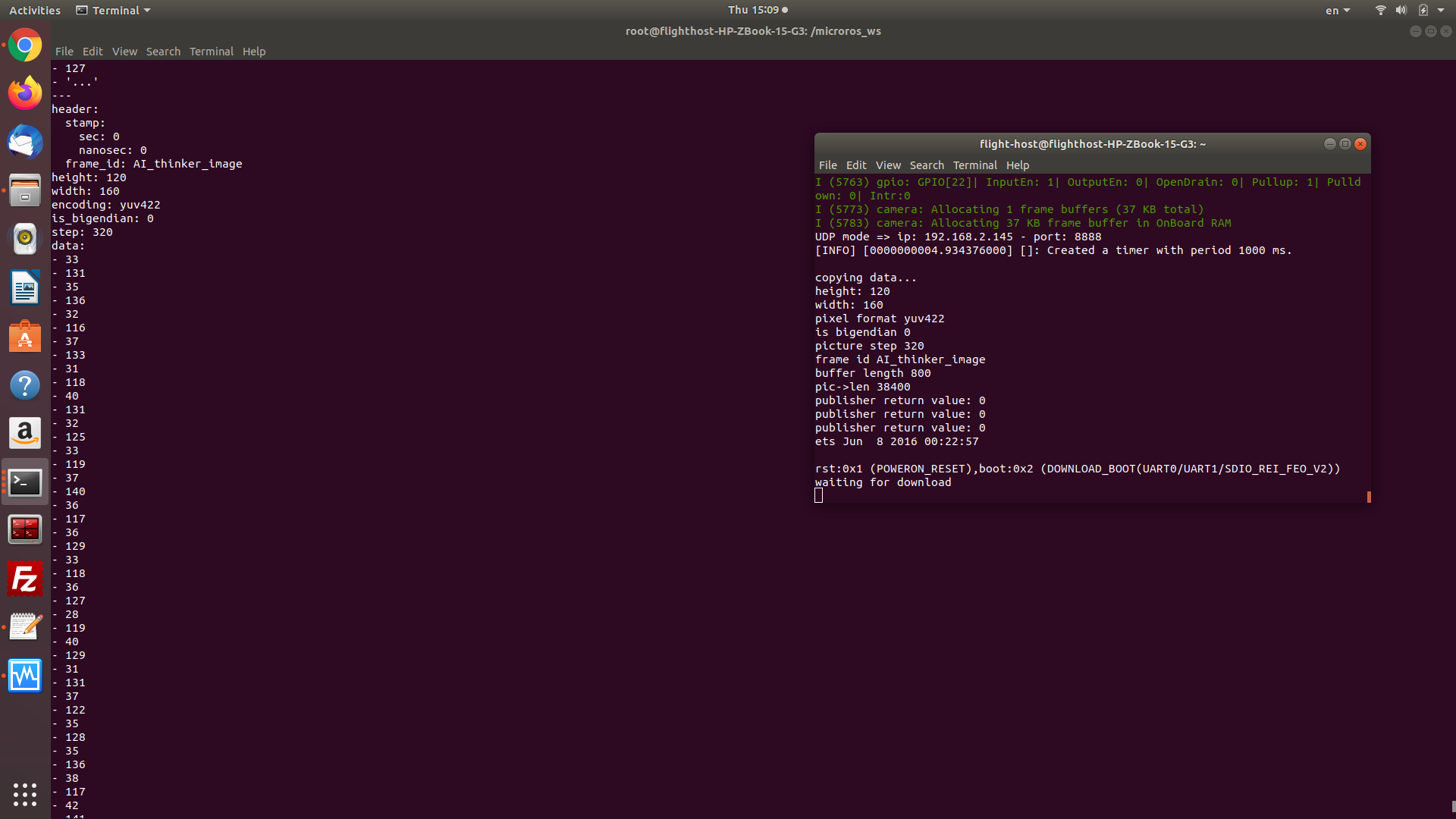
RMW_UXRCE_STREAM_HISTORY? So, I have not understood the problem... Is your client publishing? Can you receive data usingros2 topic echo ...?DorBenHarush commentedon Sep 17, 2020
Yes, I receive the data.
pablogs9 commentedon Sep 17, 2020
Ok cool, can we close the issue or you have another doubt?
DorBenHarush commentedon Sep 17, 2020
the problem is that I cant publish data bigger than 800 bytes even if i increase the parameters to 10 and 4096.
pablogs9 commentedon Sep 17, 2020
One more thing, when you modify the
colcon.metafile are you cleaning all builds?Usually when modifying the micro-ROS configuration you have to do:
ros2 run micro_ros_setup build_firmware.sh clean #clean is only valid for the ESP32 port ros2 run micro_ros_setup configure_firmware.sh [config] ros2 run micro_ros_setup build_firmware.shYou can check if your changes has been effective looking:
include/rmw_microxrcedds_c/config.handinclude/uxr/client/config.hplease make sure that in those files you see the values that you have set in your
colcon.metasDorBenHarush commentedon Sep 18, 2020
I checked files and the values didnt change even after doing the steps you mentioned, so I chnaged the values inside
include/rmw_microxrcedds_c/config.h andinclude/uxr/client/config.hto make sure that values are correct and it didnt work.
pablogs9 commentedon Sep 18, 2020
These files are not intended to be modified, please try to rebuild all from scratch and modify the colon.metas just before the creation step in order to generate these headers correctly.
I'm going to check why they are not being modified following the step I wrote above.
Keep me updated about your progress, please.
DorBenHarush commentedon Sep 18, 2020
It didnt work.
This is my workflow:
create_firmware -> add camera app and extensions(Kproject) -> configure camera as app to run -> menuconfig & building -> flash
25.9:
Hi @pablogs9, Do you know why the
config.hfiles only half correct?pablogs9 commentedon Sep 29, 2020
Hello @DorBenHarush, I am testing this issue and I have prepared this example based on yours:
https://github.com/micro-ROS/freertos_apps/blob/feature/add_image_publisher/apps/image_publisher/app.c
I have a few questions:
DorBenHarush commentedon Sep 30, 2020
Hi @pablogs9,
DorBenHarush commentedon Oct 1, 2020
Did it work?
pablogs9 commentedon Oct 1, 2020
Hello @DorBenHarush, I just have tested it in the ESP32 check the last commit. Well if the image es 120x160 pixels and we have 2 B per pixel this makes a message of approx 38400 bytes, if the MTU by default is 512 B we need an XRCE historic greater than 75. You can see this configuration here.
Due to your question, we have found an issue (we are currently investigating) in the middleware handling of fragmentation. So I would like you to test a specific branch with the fix. Having a micro-ROS workspace you can use this fix branch with:
cd firmware/mcu_ws/eProsima/Micro-XRCE-DDS-Client git checkout fix/fragments_availableUsing this app with the
fix/fragments_availablebranch of the Micro XRCE-DDS Client middleware I have this:You can see the agent receiving and publishing the topic data, the ESP32 console output with
publisher return value: 0and aros2 topic hz /freertos_image_publisherat 1 Hz.Please try this fix and give support to us.
DorBenHarush commentedon Oct 1, 2020
It didn't work I'm sill getting 1 as a return value.
I tested it on esp32cam and esp32 both didn't work
pablogs9 commentedon Oct 1, 2020
Hello @DorBenHarush.
Here you can find a screencast with instructions for building the application with the correct branches:
https://asciinema.org/a/ljRBzoNwOIxH8x6eg020tgjYU
And here you can see the operation:
https://asciinema.org/a/It2rmJ5ZqMHYpCqyva9hKtkN3
Please follow these steps and tell me if it works for you.
DorBenHarush commentedon Oct 1, 2020
Thank you for the insructions, I'll check the fix again in a few days.
07.10.2020:
Hi @pablogs9, it works now.
DorBenHarush commentedon Oct 12, 2020
Hi @pablogs9, why when I try to use this configuration the
config.hstill wont form in the right way?pablogs9 commentedon Oct 13, 2020
Because your JSON is malformed, check the ending comma in args:
DorBenHarush commentedon Oct 14, 2020
Hi @pablogs9, the file
config.his still incorrect even when the JSON file is correct. Default values only.pablogs9 commentedon Oct 14, 2020
Here you have a sample of how to do this:
https://asciinema.org/a/VIi73Ck8hazq5xdAf4txSfzmt
Keypoints:
RMW_UXRCE_MAX_HISTORYset to 1. Both meta andconfig.his shown.config.his modified.Please close when you resolve your issue or ask if you have more doubts.
Thanks!
DorBenHarush commentedon Oct 17, 2020
It works now with this configuration :
Thank you so much for the help.