

Coverage dashboard for binary-matching decompilation projects, for the person whose decomp stopped matching the original binary and has to find out which part.
Install · Quick Start · Screenshots · Potato Mode · Docs
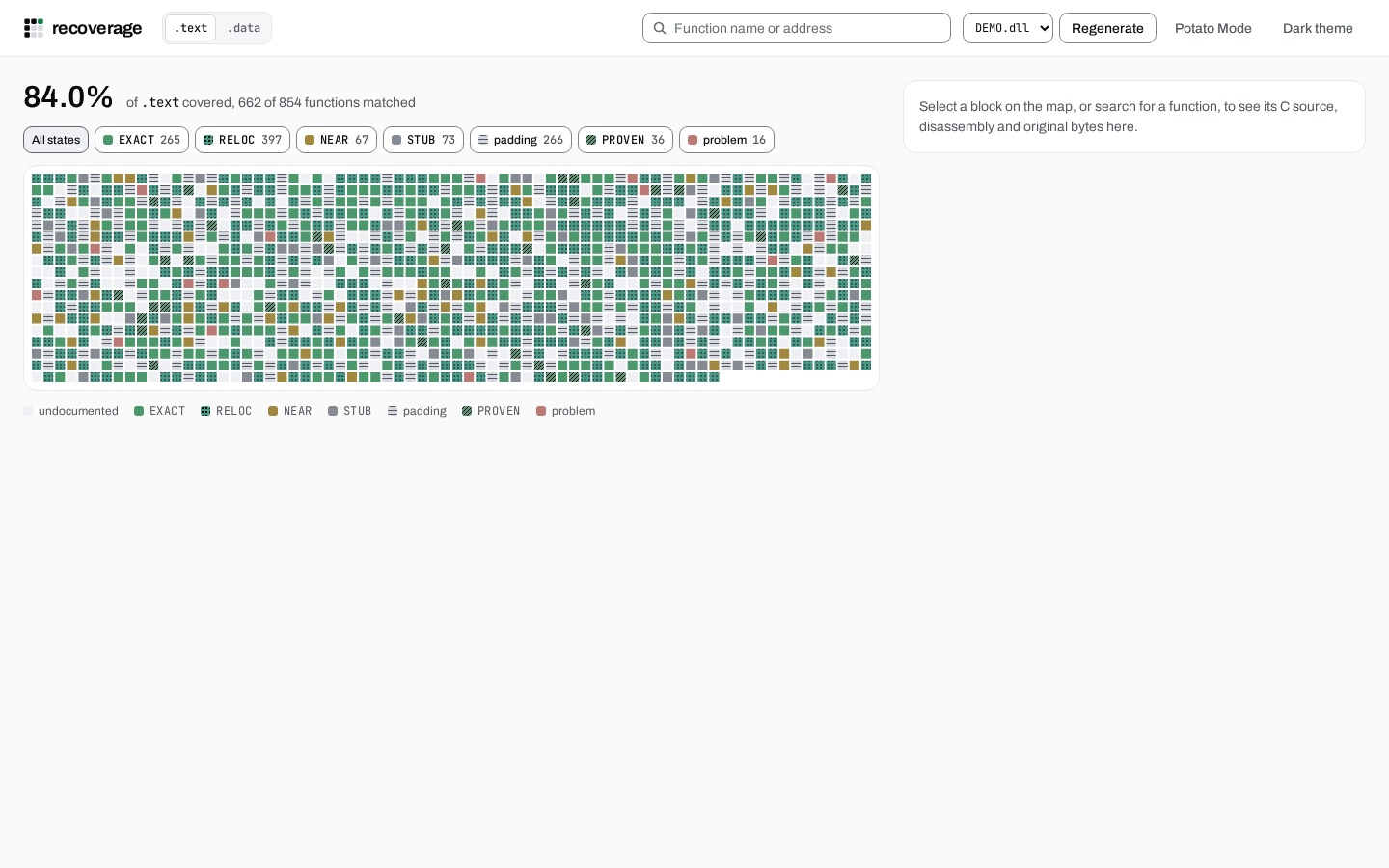
recoverage serves a local web dashboard that visualises per-byte match
status across .text, .data, .bss, and other PE sections of a
decompilation project. Think of it as a defrag map for your decomp: every
byte of the original binary is a cell in a grid, colored by how closely your C
matches the original compiled output, and the blocks that stopped matching are
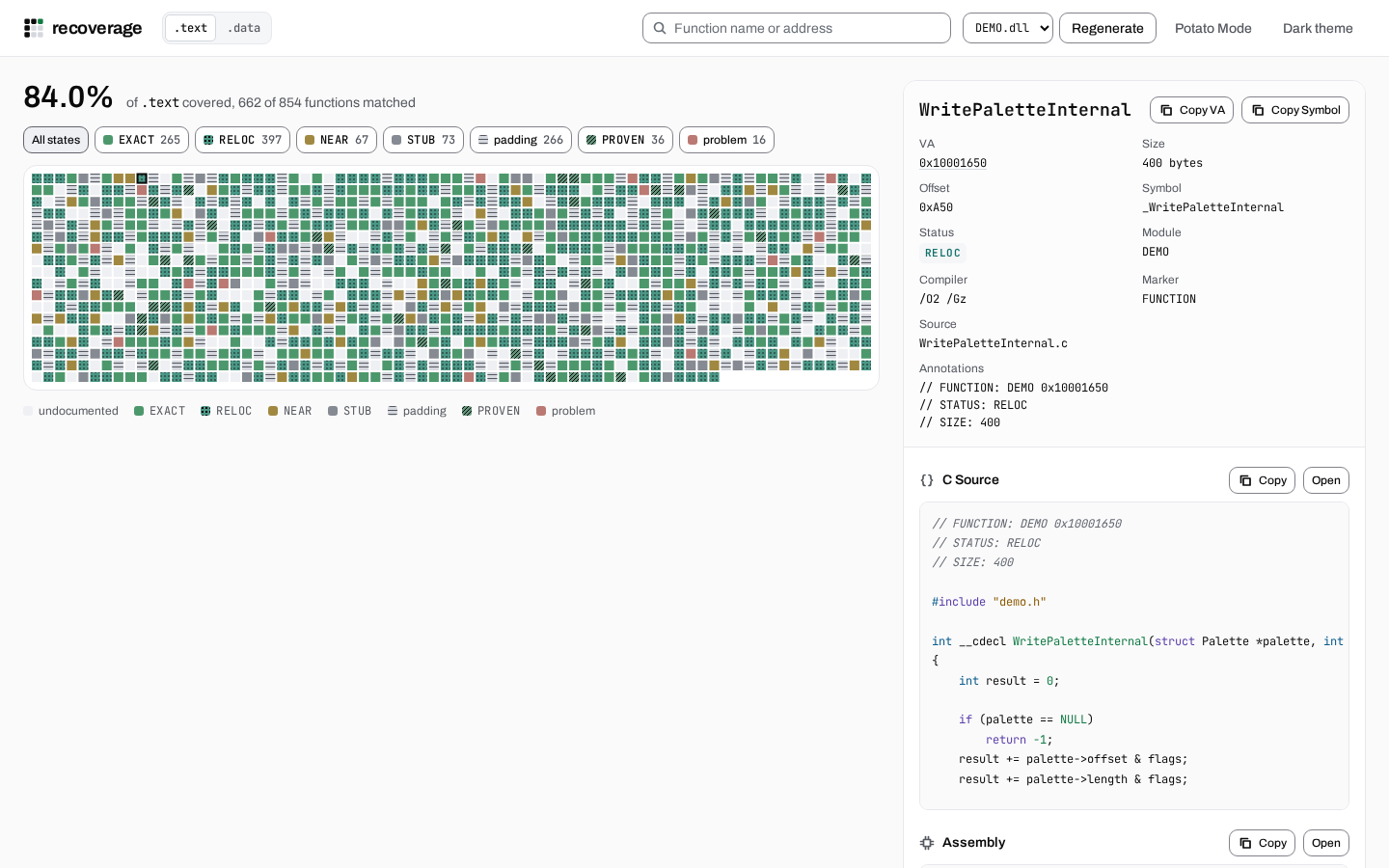
the ones you fix next. Click a block to read its C, its disassembly and its raw
bytes side by side, and a search or an address in the disassembly jumps to the
block that covers it.
| What | How |
|---|---|
| Defrag-style grid | One cell per chunk, colored by verdict: EXACT (green), RELOC (teal), PROVEN (pale green), NEAR_MATCHING (steel blue), STUB (grey), PROBLEM (red), UNDOCUMENTED (unlit) |
| Function detail panel | Click any cell for metadata, C source, disassembly, and hex dump side by side |
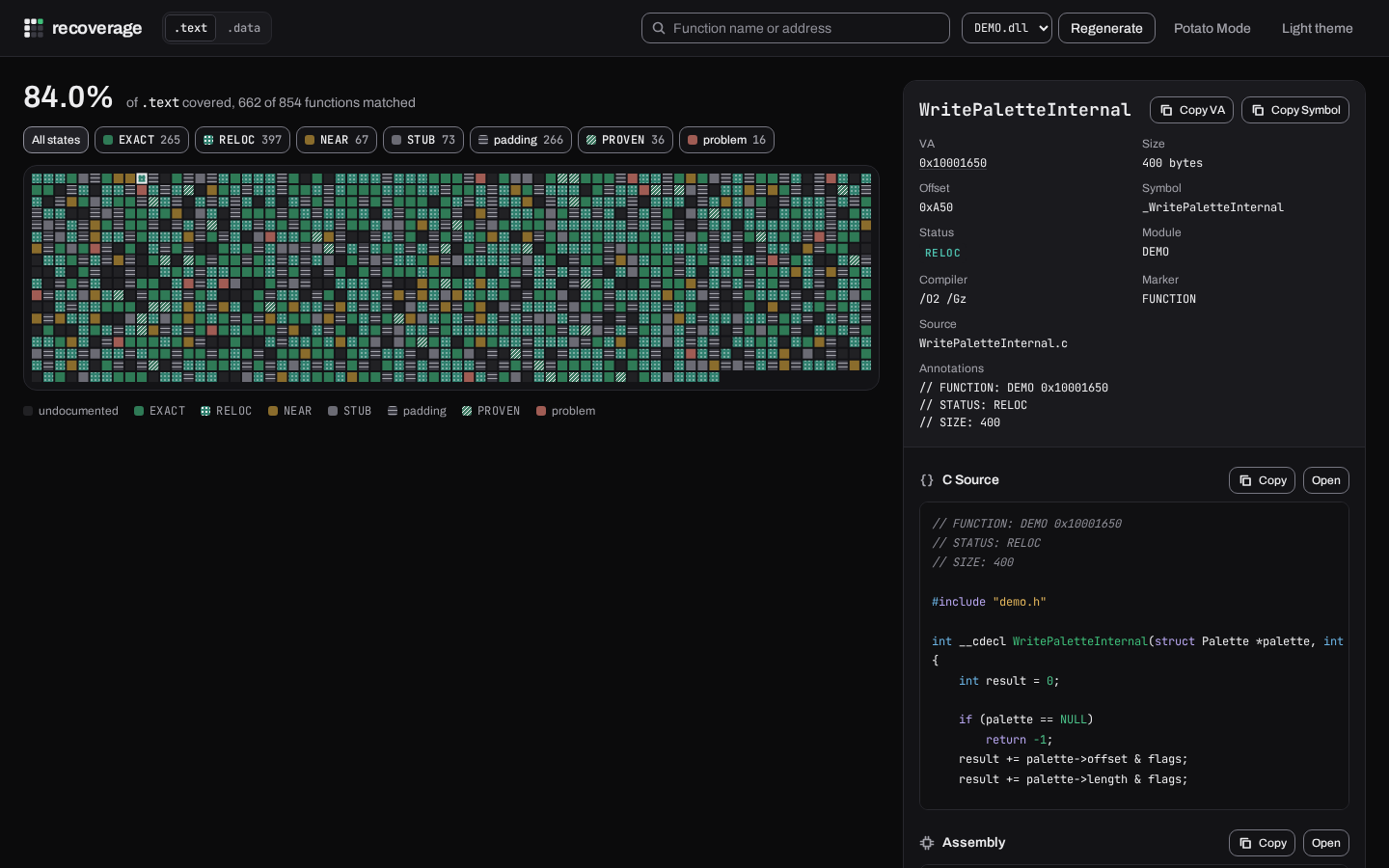
| Light and dark themes | Follows the OS, with a one-click override; both use the relumea brand tokens |
| Clickable cross-references | Hex addresses in the disassembly are live links that jump to that chunk |
| Filter by verdict | One pill per state with its block count; click one to dim every other block |
| First draw without a subrequest | HTML, CSS, and the JS bundle inlined and compressed to the smallest of Brotli/Zstd/gzip the client accepts, ~43 KB brotli today (make payload-budget re-derives it against the 90 KB ui._TCP_CWND_BUDGET ceiling) |
| Potato Mode | Zero-JS server-rendered fallback for constrained environments |
| Live regen | Refresh the project view from the browser without restarting the server |
Note
These four shots are captured from a running recoverage serve against a
synthetic project: an invented DEMO target whose coverage document was
written with tests/coverage_fixture.py's writer, beside generated C files
and generated x86 code bytes. Every name and figure in them is made up; the
layout, the palette and the states on the grid are the product's own.
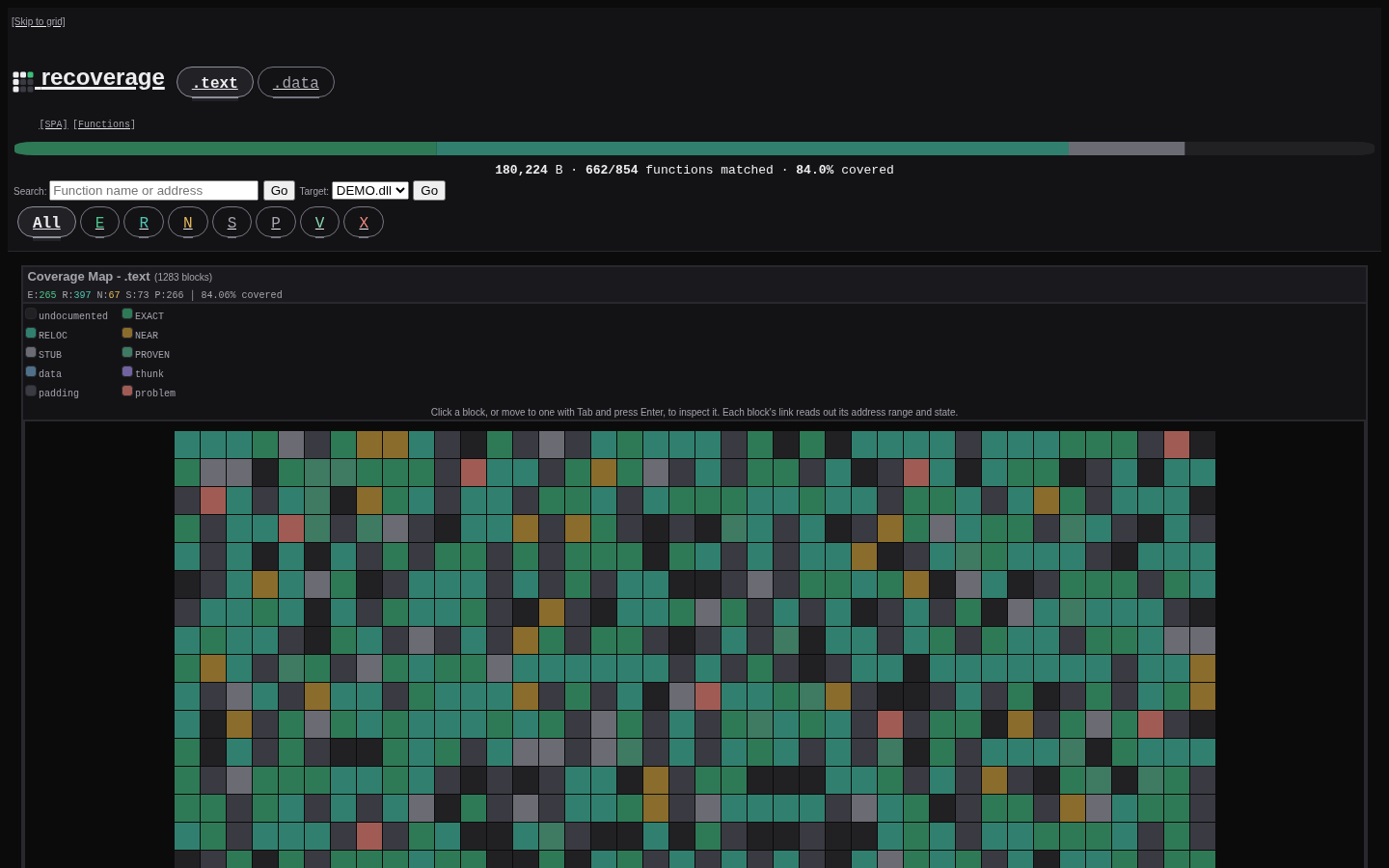
Potato Mode is a zero-JavaScript, server-side rendered HTML fallback. Every view is a plain HTML table (no CSS, no JS) so it works on low-spec machines, restricted browsers, or anywhere you just want a quick glance without loading the full SPA.
Install the published GitHub wheel into a virtual environment. Its dependency metadata fetches the exact hash-pinned Rebrew wheel automatically; no local Rebrew checkout is required.
uv venv --python 3.15.1
uv pip install "https://github.com/maci0/recoverage/releases/download/v8.7.1/recoverage-8.7.1-py3-none-any.whl"
.venv/bin/recoverage serve
On Windows, launch .venv\Scripts\recoverage.exe serve instead. Run the
server from your Rebrew project directory to view its canonical coverage.
To work on recoverage itself, start with CONTRIBUTING.md.
| Extra | Package | What it does |
|---|---|---|
capstone |
capstone | Enables on-demand disassembly in the detail panel |
pygments |
pygments | Syntax highlighting in Potato Mode |
playwright |
playwright, pytest-playwright | Browser integration tests (tests/test_playwright.py) |
A change that breaks the HTTP API, the CLI or the coverage document takes a
major version. Run recoverage config before upgrading, then read
docs/UPGRADING.md
for what each breaking major changed and
CHANGELOG.md
for the full record.
From anywhere inside an existing Rebrew project:
recoverage serveThe dashboard reads canonical metadata, binaries, sources and discovery inventory
through Rebrew's shared live coverage model. No generated coverage files or
db_dir setting is required. Input changes refresh the view automatically;
recoverage regen explicitly refreshes it without writing files.
For portable, offline viewing:
rebrew coverage export --output snapshots/
RECOVERAGE_SNAPSHOTS=/absolute/path/to/snapshots recoverage serve
Before retiring older generated exports, preserve their history:
rebrew coverage import-history --snapshots db/ --dry-run
rebrew coverage import-history --snapshots db/
The import does not change current verdicts or bindings. Keep configured inventory
files even if they live under db/. Status transitions now live in canonical
function metadata and survive dashboard restarts and export removal.
| Document | What it covers |
|---|---|
| Reference | Every CLI command and flag, the HTTP API, its query parameters, errors and caching, network hosting and WSGI mounting |
| Design | Architecture, data pipeline, frontend and Potato Mode internals |
| Design principles | The operating rules the design follows |
| User stories | Workflows and their acceptance criteria |
| Security policy | Supported versions, reporting, the deployment assumption |
| Threat model | Attack surface, trust boundaries, ranked risks |
| Recovery runbook | Backup, restore and the restore drill |
| Upgrading | Before and after for every breaking major |
| Contributing | Bootstrap, the edit-test loop, CI parity |
| Ideas | Open improvement ideas |
| Changelog | Release history |
An installed copy also answers man recoverage.
recoverage serve reads its settings from flags or from RECOVERAGE_*
variables; a flag on the command line always wins. Every flag except
--no-open and --regen has a variable, so a service can be configured
without putting anything in its argv (and, for the token, without exposing it in
the process listing). Validation, signals and service examples are under
Environment in the reference.
| Variable | Default | Accepts |
|---|---|---|
RECOVERAGE_PORT |
8001 |
integer 0-65535 |
RECOVERAGE_BIND |
127.0.0.1 |
an interface address or hostname; no whitespace, no host:port (the port belongs to RECOVERAGE_PORT), and none of the characters no address or hostname can hold: a 0.0.0.0%eth0 interface spec and a URL pasted into the unit file are startup errors naming this variable, not a bind error blaming another instance. A % is legal in exactly one place: the zone of a link-local IPv6 literal (fe80::1%1) |
RECOVERAGE_ALLOW_REMOTE |
false |
1/0, true/false, yes/no, on/off |
RECOVERAGE_CORS |
false |
same booleans |
RECOVERAGE_CORS_ORIGIN |
none | comma-separated origin URLs; each must be one a browser could send (scheme://host[:port], no userinfo, path or whitespace). A value naming no origin at all (empty, or only commas and whitespace) is a startup error, so an environment that spells "not configured" as an empty value cannot start a server that refuses every cross-origin read |
RECOVERAGE_TOKEN |
none | the bearer token; set it empty to run unauthenticated, and give it no surrounding or interior whitespace (headers arrive trimmed, so a padded value locks every reader out) |
RECOVERAGE_LOG_LEVEL |
INFO |
a logging level name, or its number (0, 10, 20, 30, 40, 50; any other number is a startup error, because a threshold no record clears logs nothing at all) |
RECOVERAGE_MAX_CONNECTIONS |
128 |
integer 1-65536: concurrent client connections admitted, one thread and one descriptor each |
RECOVERAGE_CLIENT_TIMEOUT |
120 |
integer 16-86400: per-socket-operation deadline in seconds; a client that cannot absorb a write inside it is cut mid-body |
RECOVERAGE_SNAPSHOTS |
unset (live project) | explicit portable snapshot directory; a file path is a startup error |
RECOVERAGE_BACKUP_DIR |
a backups/ beside the RECOVERAGE_SNAPSHOTS directory |
directory recoverage backup writes its archive into; read by that command and by nothing else. Never point it inside the snapshot directory: the next backup would copy the previous archive as if it were a document. A scheduled job cannot pass --to, so this is the channel that reaches it |
RECOVERAGE_FUZZ_SEED |
unset | seed for the mutation campaigns (make fuzz); read by the test suite, not the server |
RECOVERAGE_FUZZ_ITERATIONS |
unset | round count for those campaigns; same reader |
RECOVERAGE_DEV_API |
http://127.0.0.1:8001 |
the running server the make web-dev Vite proxy forwards /api, /files, /src, /original and /highlight.js to; read by web/vite.config.ts, not by any subcommand (the same rule the two fuzz knobs follow: the name is accepted so exporting it cannot refuse a command, and it changes nothing serve does) |
.env.example carries the same surface in a copy-pasteable form, commented
out, each variable with its stock value and a note on what it accepts. It is
what a systemd EnvironmentFile or a container spec is drafted from.
RECOVERAGE_BACKUP_DIR and RECOVERAGE_DEV_API are not in it yet;
tests/test_config.py fails when any other variable in config.KNOWN_VARS is
missing from it.
The dashboard ships no vendored blob under src/recoverage/assets/: the
app.js, highlight.js and style.css it serves are built by make web-build from the npm
dependencies declared in package.json, so what the build folds into those
files is distributed with the wheel whether or not anyone records where it came
from. The grants ship in NOTICE, which license-files puts in the
distribution metadata next to the MIT license, and which is the file to read
and amend when a dependency is added to web/:
| Library | Compiled into | License |
|---|---|---|
Preact (and preact/compat) |
assets/app.js |
MIT |
Highlight.js (core plus the c and x86asm grammars) |
assets/app.js, assets/highlight.js |
BSD-3-Clause |
| Tailwind CSS | assets/style.css |
MIT |
clsx, tailwind-merge, class-variance-authority (the shadcn/ui primitives' own dependencies) |
assets/app.js |
MIT |
Nothing is fetched from a CDN at runtime, so the dashboard works air-gapped.
The remaining npm packages in package.json (vite, typescript, oxlint,
@oxlint/plugins, @rikalabs/oxlint-standards, vnu-jar and the build plugins)
are build-time tools and are not shipped. tests/test_supply_chain.py fails
when a library enters the bundle without joining NOTICE. The Python half has
its own record: make license-inventory lists the license of every package
the resolved tree installs and refuses any that is not permissive.
Two pieces of lint config are checked in as copies, and their provenance is the other direction:
| Path | Origin | License |
|---|---|---|
tools/oxlint/rikalabs-strict.json |
Generated by tools/flatten_rikalabs_strict.py from the strict preset of the pinned @rikalabs/oxlint-standards 0.8.1; regenerate, do not hand-edit |
MIT (the package's LICENSE and license field); tools/flatten_rikalabs_strict.py fails if a bump changes it |
tools/oxlint/anti-slop/ |
Vendored copy of dmmulroy/anti-slop | MIT (LICENSE in that directory) |
tools/oxlint/anti-slop.manifest.json |
Generated by tools/vendor_manifest.py (make vendor-manifest): the upstream, the license, every vendored file with its sha256, and the paths left out |
first-party record of the row above |
The anti-slop copy is the one checked-in dependency no registry manifest
covers, so its own record is anti-slop.manifest.json: a re-vendor or a
local edit that skipped it fails the suite instead of landing. The upstream
rule tests are deliberately not copied (they import oxlint/plugins-dev, a
subpath no declared dependency provides, and nothing here runs TypeScript
tests); the manifest names them as excluded. To re-vendor, replace the
directory from upstream, run make vendor-manifest, then
make web-lint to confirm the rule set still passes.
MIT
The wheel also bundles the third-party code listed above. Their grants ship
as NOTICE, which license-files puts in the distribution metadata
next to the MIT license.