
Epiq is a self-hosted issue tracker persisting state as an immutable event log in your repository, versioned and synchronized via Git.
Epiq offers issue tracking as an integrated part of the development environment with workflow replay, inline code-diffs, filtering, and a tight code integration.
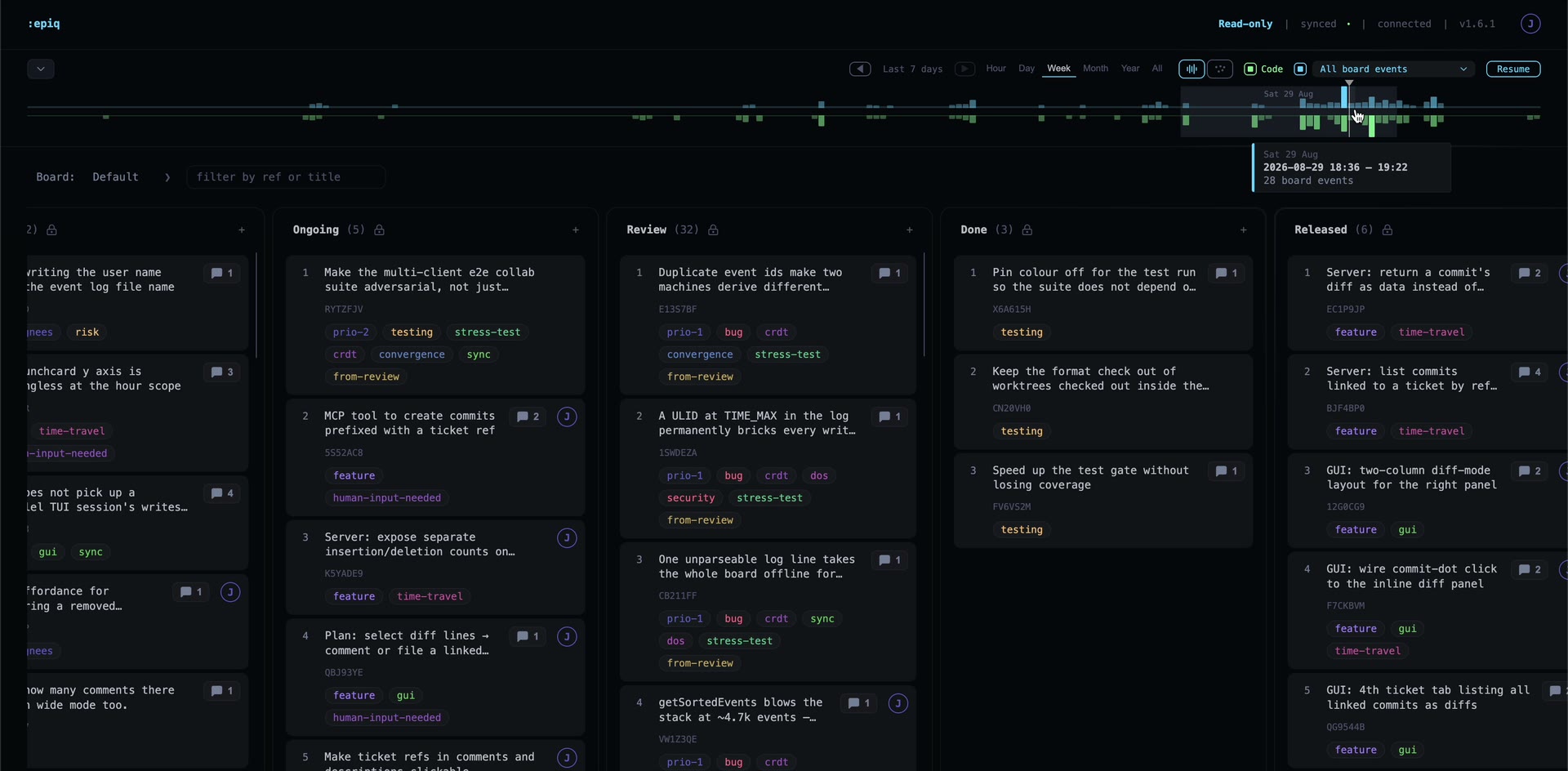
Because state is an event log, you can replay the board to find out what happened when, who made the changes, and what what lead up to it.
Commits are linked to a ticket with an Epiq-Ref: line in its body, naming the ticket's ref:
git commit -m "fix the parser" -m "Epiq-Ref: 1YRTG8T"
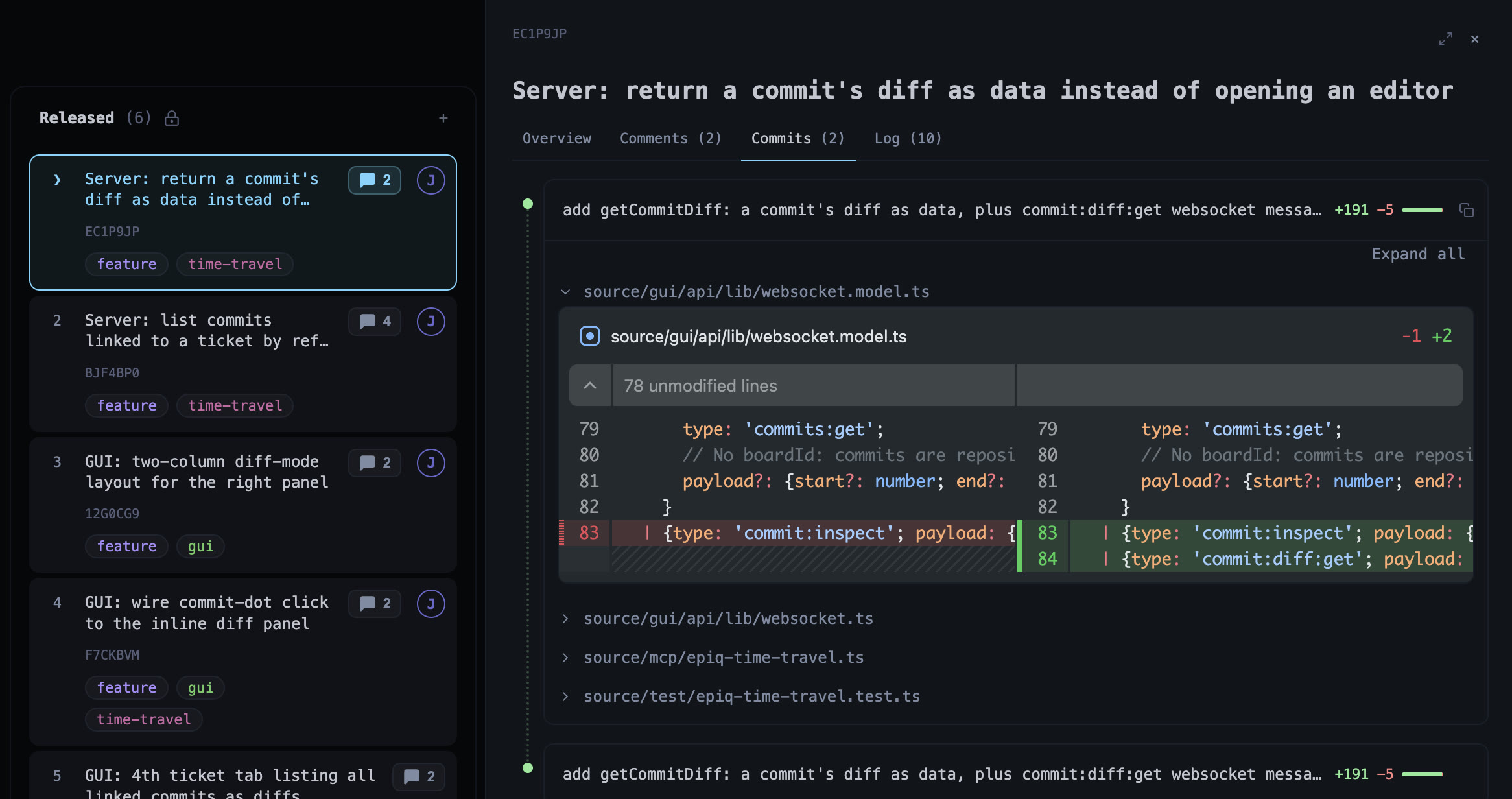
A board can read commits from other repositories too. Connecting is a board-wide action: every contributor's epiq downloads the repo on their next sync.
Epiq originated from the command line and offers a first-class terminal experience, but also features a browser interface.
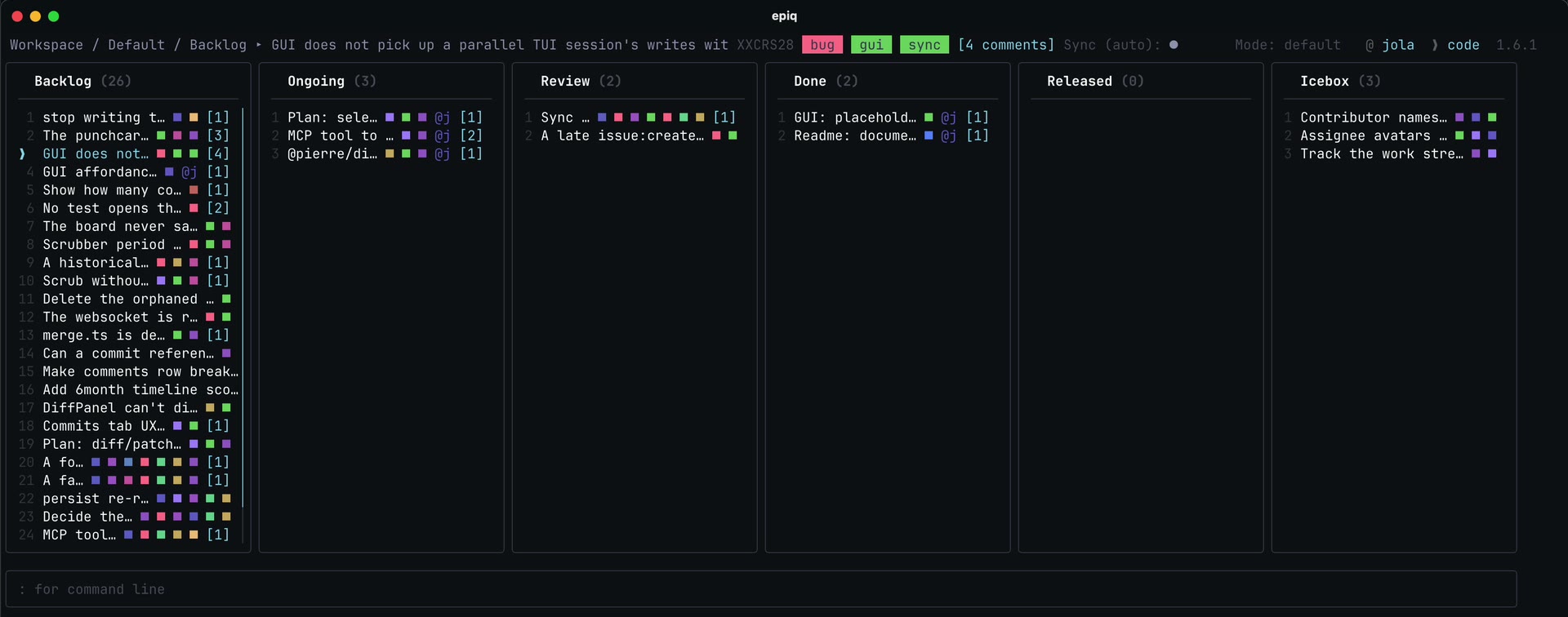
Fundamental design choices gives a system with:
- Repo-native — issues live where the code lives, simplifying sandboxed setups
- Workflow replay, - inspect what happened while you were away
- Simple setup — no accounts, SaaS, or external services required
- Offline-friendly — works anywhere, with eventual consistency
- Fast — local first edits are instant
- Portable — runs on your local machine, on a remote Linux server or your grandma’s connected toaster
- Command driven — scriptable and automation-friendly, ready for the agentic era
Binary:
curl -fsSL https://raw.githubusercontent.com/ljtn/epiq/main/install.sh | shInstalls to ~/.local/bin by default. Override with EPIQ_INSTALL_DIR (or XDG_BIN_HOME); pin a version with EPIQ_VERSION=v1.0.0.
npm install --global epiqepiq --version- Make sure you're inside a Git repository
# If needed:
git init
# For collaboration, use a repo with a remote (e.g. clone from GitHub)- Run:
epiqIf it is your first run, this opens the interactive setup wizard that sets you up in about 30 seconds.
That’s it!
Once your project is set up, you can also launch the browser user interface with:
epiq guiOn a machine with no display, or with --no-open, it serves without opening a browser; open the URL it prints.
Setup wizard creates: User config persisted in
~/.epiq-global/config.json.
Initialization creates:
- Project definition in
./.epiq/project.json- Authoritative Git state at
~/.epiq-global/worktrees/<id>- Updates your
.gitignoreto ignore local-only.epiq/log/Epiq manages a dedicated Git state branch and worktree automatically as the source of truth for synchronization.- A local debug log at
.epiq/log/epiq.log— check it first if sync, boot, or a Git operation is misbehaving.
Epiq provides a MCP (Model Context Protocol) server for agents to interact with, making it easy to plug into modern agent frameworks. The server is exposed by the epiq-mcp binary that ships with the package.
The reliable way to register the server is with the claude mcp add command — it writes to the correct config file for you, so you don't have to hand-edit JSON:
# Available everywhere (recommended)
claude mcp add --scope user epiq -- npx -y --package=epiq epiq-mcp

# Or only in the current project
claude mcp add epiq -- npx -y --package=epiq epiq-mcp
Verify the connection with claude mcp list (it should report epiq … ✔ Connected). MCP servers are loaded at startup, so restart Claude Code after adding the server before its tools become available.
Find skill at .claude/skills/epiq/SKILL.md that documents a recommended workflow for working the Epiq board. epiq_skill_install writes the same file into any repository that lacks it, so a project set up from an agent gets the rules too — after epiq_project_init, since init refuses a repository with uncommitted files; it leaves an identical copy alone and refuses to overwrite a differing one unless told to with force.
Every process — your TUI, your GUI, each agent's MCP server - writes as your user, so by default the board cannot tell one agent from another. The MCP allows agents to assume an identity, so at the start of a session, tell your agent which name it should assume.
That agent then shows up in the contributor list, assigns itself rather than you, and authors its own events. This can be useful when tracing many agents at the same time. Consider reusing names instead of inventing one per session, or the registry fills with single-run identities.
A board's or a lane's description holds its conventions: "tests before review", "one ticket per PR". The MCP hands them to agents where they apply. Assuming an identity returns the board rules, getting or moving a ticket returns its lane's, and creating one returns both. Agents are told to follow them unless they conflict with their user's instructions. Write them with epiq_board_description_edit and epiq_swimlane_description_edit, in the board's or the lane's panel in the GUI, or with edit description on a selected lane or board in the TUI.
For clients that are configured by hand, add the following to the client's MCP config file — note this is not the same as Claude Code's ~/.claude.json; Claude Desktop uses claude_desktop_config.json:
{
	"mcpServers": {
		"epiq": {
			"command": "npx",
			"args": ["-y", "-p", "epiq", "epiq-mcp"]
		}
	}
}
Once registered, agents can interact with your local Epiq instance through the MCP.
npx -y -p epiq epiq-mcp resolves the package against the npm registry every time it starts, even if it's already cached locally. In agent sandboxes with restricted network access, this can make the MCP server appear to hang. If you're running Epiq's MCP server in such an environment, install it globally once and point your MCP config at the resolved executable directly, bypassing npx (and the registry lookup) entirely on every subsequent start:
npm install --global epiq
which epiq-mcp   # use this absolute path in your MCP config
{
"mcpServers": {
"epiq": {
"command": "/absolute/path/to/epiq-mcp"
}
}
}npx remains the simpler option for normal, network-connected setups.
Epiq uses Git in the background - no manual Git commands are required. Running :sync synchronizes changes between your local state (persisted at ~/.epiq-global/worktrees/<id>/) and the remote state. By utilizing Git worktrees, synchronization stays isolated from your regular development workflow. Project tracking metadata is stored in .epiq/project.json.
Epiq is designed to provide robustness in a distributed, Git-backed environment where multiple users may update state concurrently. Instead of mutating shared files, Epiq uses an event-sourced model to prevent merge conflicts and make concurrent changes predictable.
All changes are stored as append-only events in user-scoped files, rather than modifying a shared state file. This avoids in-place edits to the same lines and significantly reduces the likelihood of Git conflicts.
State is reconstructed in-memory by replaying a merge of all user logs.
The current state is derived by replaying events in a deterministic order.
Events use a composite of time-sortable IDs (ULIDs) and a reference to the last known event ("edge"). On creation, events are appended relative to the last known event. If multiple events share the same reference point, their relative order is resolved using their time-based IDs.
This approach:
- Provides stable and reproducible ordering across machines
- Limits the impact of potential clock drift to small local ordering differences
- Ensures that concurrent updates converge to the same state
Epiq resolves concurrent changes at the event level:
- Events are designed to be idempotent where possible
- Later events take precedence when conflicts occur
- Each user writes to their own event log file
- Git merges become trivial combinations of changes in independent files
Epiq follows a local-first model:
- All operations apply instantly on the local machine
- Synchronization happens explicitly (
:sync) or automatically - When histories diverge, merging event logs and replaying them leads to a consistent state
Frequent synchronization reduces divergence and keeps the system predictable
