Repository navigation
Should br break inline elements? #1068
Description

At this moment if you press Shift + Enter inside an inline element, <br> element won't be inserted as a chidren of the inline element. The <br> will break the inline element:
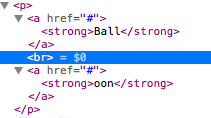
I'm not sure how it should behave. Is it correct? What if we would like to have the same link in both lines? Editing inline styles (like bold, highlights, font size, etc.) is not a problem. The issue appears if we would like to edit links that are split by the <br> element. But there is the separate ticket for it – https://github.com/ckeditor/ckeditor5-link/issues/192.
EDIT: See the workaround in this post.
Reacted by Miha Novak, Nick Mason, lovrovrazic, juresmrekar, Robert Špan, Andrei Serdeliuc, Demjan, Matic Bregar, asoderznik, lukask001 and 3 more
Activity
Reinmar commentedon Jun 19, 2018
From technical perspective it's a question whether
<br>should inherit attributes from the$text. But what we need to discuss are the user experience and HTML-oriented perspectives.Reinmar commentedon Jun 19, 2018
cc @Comandeer
Comandeer commentedon Mar 5, 2019
HTML specification allows using line break inside inline elements (or – to be more precise – inside phrasing content; block and inline elements were defined in HTML 4, HTML LS/5.x defines several other elements categories).
OTOH link is no longer only phrasing content, it's also flow one now, as it can contain flow content like
divor sections.Reinmar commentedon Mar 5, 2019
Whether HTML specification allows line breaks inside phrasing content wasn't (I think) the question here. The question is – do we need that? From a semantic standpoint I can see cases where the content should contain e.g.
<a>first address line<br>second address line</a>. Are there cases where merging e.g. subsequent<strong>elements into one that'd contain a<br>is not what the user would expect? If we don't see such scenarios, then it means that we can safely enable inline elements on soft breaks and all should be fine.DutchDave commentedon Mar 29, 2019
I noticed this behavior as well. And for the reason when removing the selection it would be nice to see the link disappear at once.
mguidetti commentedon Jan 29, 2022
Is there any current work-around for this or progress being made?
I have an implementation that needs line breaks within a single link as @Reinmar described
From my example (an event listing), ideally the output would be:
But currently if you highlight multiple lines and create a link you get:
The main issue in my case is visual, as the hover effect is applied individually to each line when applying it to the whole block would make more sense.
VesterDe commentedon Jun 24, 2022
We would really benefit from having this fixed, it's affecting our product development.
Reinmar commentedon Jul 13, 2022
There are 3 part to this ticket.
1. Extending softBreaks schema
Adding
allowAttributesOf: '$text',tosoftBreak's definition. This ensures data retention.2. Fixing ShiftEnterCommand
Adding to the ShiftEnterCommand this bit:
This will ensure that
<br>inserted by the command is inserted inside a link (does not break it)\TODO: Check whether
insertContent()clears up attributes that might not be allowed on this<softBreak>. Ideally, the<softBreak>element inserted to the model should only inherit those attributes that are really enabled on it in the schema. It's realistic that the set of attrs allowed on<softBreak>will differ from the set of attrs allowed on a text.In case,
insertContent()does not clear disallowed attributes in this specific use scenario, use theSchema#setAllowedAttributes( softBreak, model.doc.selection.getAttributes(), writer )to set only the allowed ones.3. Fixing the selection attributes' discovery
Fixing the selection attributes discovery code that it reads attributes also from inline elements. Currently, it does not:
(Note: There are no selection attributes listed in the right pane)
Scope of this ticket
Let's cover the points 1 and 2 in this ticket.
The 3rd part (selection attrs discovery) is tricky and hence, worth moving to a separate issue. The result of not fixing this will not be very visible anyway.
Reinmar commentedon Jul 13, 2022
Other considerations:
<paragraph><$text linkHref=x>foo</$text><softBreak linkHref=x /></p>because it's not possible to place the selection after the soft break. That's due to lack ofgetFillerOffset()onAttributeElement. Action needed.<softBreak>s(ones not surrounded by any content). Action needed.<br>s influence the quality of content filtering on paste? E.g. CKEditor 4 strips all text formatting if it wraps only a<br>. E.g.setData( '<p>x<strong><br></strong>x</p>' )will load only<p>x<br>x</p>). Action needed.Reinmar commentedon Jul 13, 2022
Taken the other findings, it's hard to figure out what's the MVP here. Some of the "other findings" would also need to be included in the MVP. Thus, the complexity grows.
Reinmar commentedon Jul 13, 2022
Since this is not a quick win and I don't know the ETA for a complete resolution of this issue (in a way that we may accept in the core) I'd like to propose a simple workaround for all of you dealing with data migration from e.g. CKEditor 4.
The solution is really simple – you just need to load an additional plugin to the editor.
The plugin looks like this:
It has no external dependencies so it can be added even to a build via
config.extraPlugins.It makes the editor keep
<br>s inside<a>elements:rgpublic commentedon Sep 20, 2023
The LinkableBRs plugin provided by @Reinmar is useful if you edit the source code, but it doesn't fix the Shift+Enter issue. It's probably more difficult to modify the ShiftEnterCommand's insertBreak method by a plugin as described, right?
Witoso commentedon Sep 25, 2023
@rgpublic, I think you would need to listen for
ShiftEnterCommand's execute event, stop it, and replace the implementation 🤔.jonmenard commentedon Dec 20, 2023
I am using Drupal 9/10 and CKeditor5 is built into core, does anyone know how to add the proposed class LinkableBRs {} in drupal?
Current I am trying to use
hook_editor_js_settings_alter(array &$settings){}arfanseptianto commentedon Jan 25, 2024
Have you found the solution for this? I also got this issue.. Drupal 10.2.2
jonmenard commentedon Jan 25, 2024
Was unable to find a solution yet
Witoso commentedon Jan 25, 2024
@jonmenard @arfanseptianto could you reach Drupal community on Slack? I'm not an expert in their ecosystem, I assume you could just load somehow the plugin into the editor's plugins list.
danielkorte commentedon Jan 25, 2024
@jonmenard and @arfanseptianto Try this: https://github.com/danielkorte/custom_linkablebrs
jonmenard commentedon Jan 25, 2024
The solution provided by @danielkorte worked perfectly!
Here's an overview of my project structure to give you a clearer picture. The cdlsimod represents our custom module, and custom_linkablebrs is the cloned environment with the provided repository's contents.
To integrate the solution, I executed the following commands:
Alternatively, if you prefer a GUI approach, you can enable the module and clear the caches directly through the website's administrative interface.
arfanseptianto commentedon Jan 26, 2024
Yes, works like a charm. Thank you @danielkorte