
The open-source thread-plane for Angular agents.




Threadplane is the open-source thread-plane for Angular agents. Chat, durable
threads, persistence, human approvals, tool progress, subagents, and generative UI — built on
Angular Signals and dependency injection, for Angular 20–22. Your backend stays
where it is: Threadplane adapts a LangGraph or AG-UI agent into a runtime-neutral
Agent contract that the UI consumes, and renders generated UI with the design
system components you already own.
MIT · Angular 20–22 · no account, no cloud
Experimental native React previews are available through the docs' Example UI
selector. The AG-UI JSON Render preview
uses the existing airline agent, six authored read-only views and native shared
state. These React packages remain private source builds; from a checkout, run
npx nx build cockpit-ag-ui-json-render-react and the matching npx nx e2e target.
npm install @threadplane/chat @threadplane/langgraph @langchain/core @langchain/langgraph-sdk markedTalking to an AG-UI endpoint instead:
npm install @threadplane/chat @threadplane/ag-ui @ag-ui/client @ag-ui/core markedPeer dependencies:
@angular/core              ^20.0.0 || ^21.0.0 || ^22.0.0   # every Angular package here
marked                     ^15.0.0 || ^16.0.0              # @threadplane/chat
rxjs                       ~7.8.0                          # @threadplane/chat and both adapters
@langchain/core            ^1.1.33                         # @threadplane/langgraph
@langchain/langgraph-sdk   ^1.7.4                          # @threadplane/langgraph
@ag-ui/client              ^1.0.1                          # @threadplane/ag-ui
@ag-ui/core                ^1.0.1                          # @threadplane/ag-ui
Each package README lists that package's full peer set.
Start with the fake agent. It streams a canned reply in the browser, so the UI can be built and tested before a server, a graph, or an API key exists.
// app.config.ts — no server, no LLM, deterministic output
import { ApplicationConfig } from '@angular/core';
import { provideFakeAgent } from '@threadplane/langgraph';

export const appConfig: ApplicationConfig = {
  providers: [
    provideFakeAgent({ tokens: ['Hello', ' from', ' Threadplane'] }),
  ],
};
// support-agent.component.ts
import { Component } from '@angular/core';
import { injectAgent } from '@threadplane/langgraph';
import { ChatComponent } from '@threadplane/chat';
@Component({
imports: [ChatComponent],
template: `<chat [agent]="agent" />`,
})
export class SupportAgentComponent {
protected readonly agent = injectAgent();
}agent.messages() and agent.status() are Angular Signals. Bind them directly
in a template — no subscriptions, no async pipe, no zone.js required. The same
fake agent is what tests run against: swap the transport, never the component.
Walkthrough: Try without a backend.
When the UI works, point it at a real runtime. Only the provider changes — the
component above is untouched, because @threadplane/chat consumes the
runtime-neutral Agent contract rather than any adapter type.
// LangGraph Platform, or a local `langgraph dev` server
import { provideAgent } from '@threadplane/langgraph';

provideAgent({ apiUrl: 'http://localhost:2024', assistantId: 'agent' });
// Any AG-UI-compatible endpoint
import { provideAgent } from '@threadplane/ag-ui';
provideAgent({ url: 'http://localhost:8000/agent' });Which one to pick: Choosing an adapter.
- demo.threadplane.ai — the LangGraph demo: streaming, durable threads, interrupts, subagents, and generative UI.
- ag-ui.threadplane.ai — the same chat surface over an AG-UI backend.
- Generative UI, live in the docs.
Published packages follow a patch-only 0.0.x release policy: no minor or major
bump silently changes a lockfile.
| Package | Purpose | License |
|---|---|---|
@threadplane/chat |
The Angular agent chat surface: <chat>, headless primitives, opinionated compositions, interrupts, subagents, generative UI |
MIT |
@threadplane/langgraph |
LangGraph adapter; provideAgent() / injectAgent() expose a LangGraph run as Angular Signals |
MIT |
@threadplane/ag-ui |
AG-UI adapter; bridges any @ag-ui/client-compatible backend into the same chat surface |
MIT |
@threadplane/render |
@json-render/core-backed Angular render engine that maps JSON specs to your own components |
MIT |
@threadplane/a2ui |
A2UI protocol types, streaming parser, and dynamic-value resolver; pure TypeScript, no Angular dependency | MIT |
@threadplane/middleware |
Backend middleware for client-declared tools; the /langgraph entrypoint targets LangGraph.js |
MIT |
@threadplane/telemetry |
Explicit Node and browser capture helpers for applications that choose to send events | MIT |
Generated UI renders through a registry you control:
import { provideViews, views } from '@threadplane/render';

provideViews(views({ KpiCard: KpiCardComponent, DisruptionsTable: DisruptionsTableComponent }));
An agent can render those components and nothing else, so generative UI stays inside your design system.
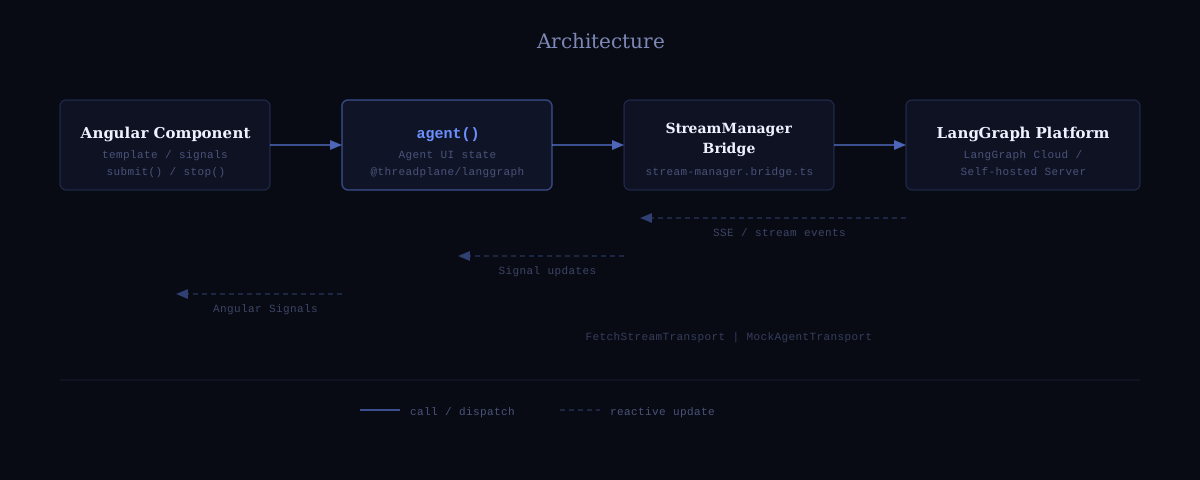
provideAgent() creates the agent's internal BehaviorSubjects at
injection-context time — once, when the provider factory runs. injectAgent()
retrieves the configured agent in any component. The StreamManager bridge (the
only file that touches @langchain/langgraph-sdk internals) pushes stream events
into those subjects. toSignal() converts each subject to an Angular Signal,
also at construction time. Dynamic actions (submit, stop, switchThread)
push into the existing subjects — no new subjects are ever created after
construction. This architecture is required because toSignal() must be called
in an injection context and cannot be called again later.
The runtime-neutral Agent contract is the stability boundary between adapters
and the chat surface. @threadplane/chat consumes Agent — not
LangGraphAgent — so swapping @threadplane/langgraph for
@threadplane/ag-ui requires no changes to chat components or templates.
Reliability: every pull request runs the "Library — lint / test / build" CI
job across all packages. Testing uses MockAgentTransport to swap the transport
layer, so injectAgent() itself never needs to be mocked — just substitute the
transport.
injectAgent() is the Angular counterpart to LangGraph's React useStream()
hook, projected through the runtime-neutral Agent contract.
| Capability | injectAgent() (Angular) |
useStream() (React) |
|---|---|---|
| Streaming state as reactive primitives | Angular Signals | React state |
| Messages signal | messages() |
messages |
| Loading state | isLoading() |
isLoading |
| Error state | error() |
— |
| Runtime-neutral status | status() — 'idle' | 'running' | 'error' |
partial |
| Interrupt / human-in-the-loop | interrupt() (runtime-neutral) / langGraphInterrupts() (raw plural) |
interrupt / interrupts |
| Tool call progress | toolCalls() |
toolCalls |
| Branch / history | branch() / history() / experimentalBranchTree() |
branch / history / experimental_branchTree |
| Pending run queue | queue() |
queue |
| Subagent map and lookup | subagents() — Signal<Map<string, Subagent>> / getSubagent(toolCallId) |
subagents / helper methods |
| Reactive thread switching | switchThread(id) |
prop |
| Submit | submit(values, opts?) |
submit(values, opts?) |
| Stop | stop() |
stop() |
| Regenerate response | regenerate(assistantMessageIndex) |
— |
| Reload last submission | reload() |
— |
| Custom transport (for testing) | MockAgentTransport |
mock fetch |
Angular ResourceRef<T> compatibility |
Full duck-type parity | N/A |
| Angular 20–22 Signals API | Native | N/A |
| SSR / Server Components | Client-side only | React Server Components (React) |
- Try without a backend
- LangGraph quickstart
- AG-UI quickstart
- Choosing an adapter
- API Reference
- Chat introduction
- Human approvals and interrupts
- Durable threads
- Subgraph and subagent streaming
Run npm run generate-api-docs after changing public TypeScript exports or TSDoc. API Extractor reads checked TypeScript declarations and TSDoc directly, without a model. Its output in apps/website/content/api drives import-path indexes and symbol pages at /docs/api. Run npm run generate-api-docs:check to verify the committed reference is current. The website build generates the reference and packages runtime content into the build artifact for search and dynamic routes. Narrative guides remain authored MDX.
Every published package in this repository is released under the MIT License — free for commercial and noncommercial use, modification, and redistribution with the required notice.
There is no account to create and no Threadplane service between the application and the agent backend: adapters talk to the endpoint that is configured. How Threadplane handles data on its own properties is described at threadplane.ai/privacy.