
.NET Redis Distributed Cache library based on StackExchange.Redis and Redis.
##Features
- Typed cache: any serializable object can be used as a cache value.
- Fetching mechanism: shortcut cache methods for atomic add/get operations (cache-aside pattern).
- Tagging mechanism: cache items can be tagged allowing to retrieve or invalidate keys (or hash fields) by tag.
- Time-To-Live mechanism: each key can be associated to a value defining its time-to-live.
- Lexicographically sorted sets: for fast string matching and auto-complete suggestion.
- Pub/Sub support: Publish-Subscribe implementation with typed messages.
- Geospatial indexes: with radius queries support.
- HyperLogLog support: to count unique things.
- Configurable Serialization: a compressed binary serializer by default, or provide your own serialization.
- Redis data types as .NET collections: List, Set, Sorted Set, Hash and Bitmap support as managed collections.
- Redis Keyspace Notifications: Subscribe to Pub/Sub channels in order to receive events affecting the Redis data set.
- Fully compatible with Redis Cluster: all commands are cluster-safe.
PM> Install-Package CachingFramework.Redis
The Context class provides all the functionality divided into five categories, each of which is exposed as a property with the following names:
- Cache
- Collections
- GeoSpatial
- PubSub
- KeyEvents
Connect to Redis on localhost port 6379:
var context = new Context();var context = new Context("10.0.0.1:7000, 10.0.0.2:7000, connectRetry=10, abortConnect=false, allowAdmin=true");See this for StackExchange.Redis configuration options.
Any primitive type or serializable class can be used as a cache value.
string redisKey = "user:1";
User value = new User() { Id = 1 };  // any serializable object
context.Cache.SetObject(redisKey, value);
Add a single object to the cache with a Time-To-Live of 1 day:
context.Cache.SetObject(redisKey, value, TimeSpan.FromDays(1));User user = context.Cache.GetObject<User>(redisKey);context.Cache.Remove(redisKey);Shortcut methods are provided for atomic add/get operations (see Cache-Aside pattern).
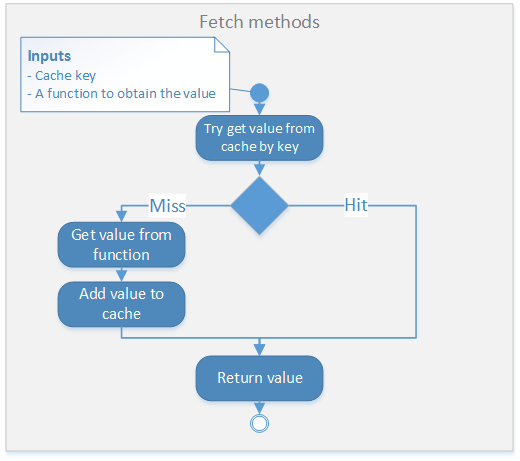
Try to get an object from the cache, inserting it to the cache if it does not exists:
var user = context.Cache.FetchObject<User>(redisKey, () => GetUserFromDatabase(id));The method GetUserFromDatabase will only be called when the value is not present on the cache, in which case will be added to the cache before returning it.
Fetch an object with a time-to-live:
var user = context.Cache.FetchObject<User>(redisKey, () => GetUserFromDatabase(id), TimeSpan.FromDays(1));Hashes are maps composed of fields associated with values, like .NET dictionaries.
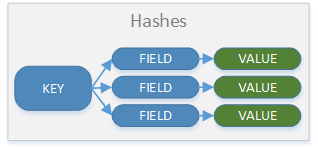
Set an object on a redis key indexed by a field key (sub-key):
void InsertUser(User user)
{
    var redisKey = "users:hash";
    var fieldKey = "user:id:" + user.Id;
    context.Cache.SetHashed(redisKey, fieldKey, user);
}
Get an object by the redis key and a field key:
User u = context.Cache.GetHashed<User>("users:hash", "user:id:1");IDictionary<string, User> users = context.Cache.GetHashedAll<User>("users:hash");Objects within a hash can be of different types.
context.Cache.RemoveHashed("users:hash", "user:id:1");var user = context.Cache.FetchHashed<User>("users:hash", "user:id:1", () => GetUser(1));The method GetUser will only be called when the value is not present on the hash, in which case will be added to the hash before returning it.
Hashes can be handled as .NET Dictionaries by using the GetRedisDictionary method on Context.Collections, for example:
var dict = context.Collections.GetRedisDictionary<string, User>("users:hash");
dict.Add("user:id:1", user);
For more information about collections, please see COLLECTIONS.md.
Cluster compatible tagging mechanism where tags are used to group keys and hash fields, so they can be retrieved or invalidated at the same time. A tag can be related to any number of keys and/or hash fields.

Add a single object to the cache and associate it with tags red and blue:
context.Cache.SetObject(redisKey, value, new[] { "red", "blue" });Tags can be also related to a field in a hash.
context.Cache.SetHashed(redisKey, field, value, new[] { "red" });Relate the key to the green tag:
context.Cache.AddTagsToKey(redisKey, new [] { "green" });Relate the hash field to the green tag:
context.Cache.AddTagsToHashField(redisKey, field, new[] {"green"});Remove the relation between the key and the tag green:
context.Cache.RemoveTagsFromKey(redisKey, new [] { "green" });Remove the relation between the hash field and the tag green:
context.Cache.RemoveTagsFromHashField(redisKey, field, new [] { "green" });Get all the objects related to red and/or green. Assuming all the keys related to the tags are of the same type:
IEnumerable<User> users = context.Cache.GetObjectsByTag<User>("red", "green");Remove all the keys and hash fields related to blue and/or green tags:
context.Cache.InvalidateKeysByTag("blue", "green");A typed Publish/Subscribe mechanism is provided.
Listen for messages of type User on the channel users:
context.PubSub.Subscribe<User>("users", user => Console.WriteLine(user.Id));Publishes a messages of type User to the channel users:
context.PubSub.Publish<User>("users", new User() { Id = 1 });context.PubSub.Unsubscribe("users");Each subscription listen to messages of the specified type (or inherited from it):
context.PubSub.Subscribe<User>("entities", user => Console.WriteLine(user.Id));
context.PubSub.Subscribe<Manager>("entities", mgr => Console.WriteLine(mgr.Id));
Subscription of type object will listen to all types:
context.PubSub.Subscribe<object>("entities", obj => Console.WriteLine(obj));Redis Pub/Sub supports pattern matching in which clients may subscribe to glob-style patterns to receive all the messages sent to channel names matching a given pattern.
context.PubSub.Subscribe<User>("users.*", user => Console.WriteLine(user.Id));This will listen to any channel whose name starts with "users.".
context.PubSub.Unsubscribe("users.*");static void Main()
{
var context = new Context("10.0.0.1:7000");
context.PubSub.Subscribe<string>("chat", m => Console.WriteLine(m));
while (true)
{
context.PubSub.Publish("chat", Console.ReadLine());
}
}The Geospatial Redis API is not yet available in a stable version of Redis. Download unstable if you want to test these commands.
Add a user to a geospatial index by its coordinates:
string redisKey = "users:geo";
context.GeoSpatial.GeoAdd<User>(redisKey, new GeoCoordinate(20.637, -103.402), user);GeoCoordinate coord = context.GeoSpatial.GeoPosition(redisKey, user);
var lat = coord.Latitude;
var lon = coord.Longitude;Get the distance in Kilometers between two user items:
double dist = context.GeoSpatial.GeoDistance(redisKey, user1, user2, Unit.Kilometers);Get the users within a 100 Km radius:
string redisKey = "users:geo";
var center = new GeoCoordinate(20.553, -102.925);
double radius = 100;
var results = context.GeoSpatial.GeoRadius<User>(redisKey, center, radius, Unit.Kilometers);
The results includes the position and the distance from the center:
foreach (var r in results)
{
    double dist = r.DistanceToCenter;
    GeoCoordinate pos = r.Position;
    User user = r.Value;
    ...
}
Get the distance (in kilometers) between two addresses by using GoogleMaps.LocationServices:
private Context _context = new Context();
private GoogleLocationService _location = new GoogleLocationService();

public double Distance(string address1, string address2)
{
    var redisKey = "dist";
    var loc1 = _location.GetLatLongFromAddress(address1);
    var loc2 = _location.GetLatLongFromAddress(address2);
    _context.GeoSpatial.GeoAdd(redisKey, new[]
    {
      new GeoMember<string>(loc1.Latitude, loc1.Longitude, address1),
      new GeoMember<string>(loc2.Latitude, loc2.Longitude, address2)
    });
    return _context.GeoSpatial.GeoDistance(redisKey, address1, address2, Unit.Kilometers);
}
For example:
double km = Distance("London", "Buenos Aires");The Redis HyperLogLog implementation provides a very good approximation of the cardinality of a set using a very small amount of memory.
To add elements to the HLL, use the HyperLogLogAdd method:
bool result = context.Cache.HyperLogLogAdd<string>("key", "10.0.0.1");The method returns True if the underlying HLL count was modified.
To get the cardinality (the count of unique elements) use the HyperLogLogCount method:
long count = context.Cache.HyperLogLogCount("key");Considering a unique login as the Username + IP address combination.
Each time a user login, add the element to the HLL with the HyperLogLogAdd method:
public void OnLogin(string userName, string ipAddress)
{
    var info = new LoginInfo(userName, ipAddress);
    var key = "logins:" + DateTime.Now.ToString("yyyyMMdd");
    context.Cache.HyperLogLogAdd(key, info);
}
To get the unique login count for a specific date, use the HyperLogLogCount method:
public long GetLoginCount(DateTime date)
{
    var key = "logins:" + date.ToString("yyyyMMdd");
    return context.Cache.HyperLogLogCount(key);
}To provide your own serialization mechanism implement the ISerializer interface.
For example, a custom serializer for simple types:
public class MySerializer : ISerializer
{
    public byte[] Serialize<T>(T value)
    {
        return Encoding.UTF8.GetBytes(value.ToString());
    }
    public T Deserialize<T>(byte[] value)
    {
        return (T)Convert.ChangeType(Encoding.UTF8.GetString(value), typeof(T));
    }
}
The Context class has constructor overloads to supply the serialization mechanism, for example:
var context = new Context("localhost:6379", new MySerializer());Different serialization mechanisms are provided:
-
Binary Serializer (default): All types are serialized using the .NET
BinaryFormatterfromSystem.Runtime.Serializationand compressed using GZIP fromSystem.IO.Compression. -
Json Serializer (default when using CachingFramework.Redis.Json package): All types are serialized using the JSON.NET library. This mechanism is optional and is included in package CachingFramework.Redis.Json.
-
Raw Serializer: The simple types are serialized as strings (UTF-8 encoded). Any other type is binary serialized using the .NET
BinaryFormatterand compressed using GZIP.
| Inheritance | Data | Configuration | |
|---|---|---|---|
| BinarySerializer | Full inheritance support | Data is compressed and not human readable | Serialization cannot be configured (except NonSerialized attribute) |
| JsonSerializer | Limited inheritance support | Data is stored as Json | Serialization can be configured with JsonSerializerSettings |
| RawSerializer | Limited inheritance, only for types serialized with BinaryFormatter | Simple types are stored as strings and are human readable | Serialization can be set-up per type using SetSerializerFor |
The RawSerializer allows to override the serialization/deserialization logic per type with method SetSerializerFor<T>().
For example, to allow the serialization of a StringBuilder as an UTF-8 encoded string:
var raw = new RawSerializer();
raw.SetSerializerFor<StringBuilder>
(
    sb => Encoding.UTF8.GetBytes(sb.ToString()),
    b => new StringBuilder(Encoding.UTF8.GetString(b))
);
var context = new Context("localhost:6379", raw);
To use the JSonSerializer, install the CachingFramework.Redis.Json package:
PM> Install-Package CachingFramework.Redis.Json
And use the provided json context:
var context = new CachingFramework.Redis.Json.Context("localhost:6379");Subscribe to keyspace events to receive events affecting the Redis data. See the Redis notification documentation.
By default keyspace events notifications are disabled. To enable notifications use the notify-keyspace-events of redis.conf or via the CONFIG SET, for example:
redis> CONFIG SET notify-keyspace-events KEA
To access the Keyspace Notifications API, use the Subscribe/Unsubscribe methods on the context's KeyEvents property.
The subscribe method callback in an Action<string, KeyEvent> where the first parameter is the Redis key affected, and the second is the operation performed.
Receive all the commands affecting a given key:
context.KeyEvents.Subscribe("user:1", (string key, KeyEvent cmd) =>
{
    if (cmd == KeyEvent.Delete)
    {
        //Key "user:1" was deleted
    }
    Console.WriteLine("command " + cmd);
});
Receive all the LPUSH affecting any key:
context.KeyEvents.Subscribe(KeyEvent.PushLeft, (key, cmd) =>
{
    Console.WriteLine("key {0} received an LPUSH", key);
});
Receive any command affecting any key:
context.KeyEvents.Subscribe(KeyEventSubscriptionType.All, (key, cmd) =>
{
    Console.WriteLine("key {0} - command {1}", key, cmd);
});
Stop receiving all commands affecting the given key:
context.KeyEvents.Unsubscribe("user:1");Stop receiving LPUSH commands affecting any key:
context.KeyEvents.Unsubscribe(KeyEvent.PushLeft);Implementations of .NET IList, ISet and IDictionary that internally uses Redis as storage are provided.
For details please see COLLECTIONS.md documentation file