Repository navigation
VideoPlayer Cannot Play Url #87
Description

I'm getting these errors.
[USharpVideo] Video player error when trying to load https://youtu.be/dQw4w9WgXcQ?si=kcgxZQ2VaH8iDnU2
UnityEngine.Debug:LogError (object,UnityEngine.Object)
VRC.Udon.Wrapper.Modules.ExternUnityEngineDebug:__LogError__SystemObject_UnityEngineObject__SystemVoid (VRC.Udon.Common.Interfaces.IUdonHeap,System.Span1<uint>) VRC.Udon.VM.UdonVM:Interpret () VRC.Udon.UdonBehaviour:RunProgram (uint) (at ./Packages/com.vrchat.worlds/Runtime/Udon/UdonBehaviour.cs:1035) VRC.Udon.UdonBehaviour:RunProgram (string) (at ./Packages/com.vrchat.worlds/Runtime/Udon/UdonBehaviour.cs:1010) VRC.Udon.UdonBehaviour:SendCustomEvent (string) (at ./Packages/com.vrchat.worlds/Runtime/Udon/UdonBehaviour.cs:1675) VRC.Udon.Wrapper.Modules.ExternVRCUdonCommonInterfacesIUdonEventReceiver:__SendCustomEvent__SystemString__SystemVoid (VRC.Udon.Common.Interfaces.IUdonHeap,System.Span1)
VRC.Udon.VM.UdonVM:Interpret ()
VRC.Udon.UdonBehaviour:RunProgram (uint) (at ./Packages/com.vrchat.worlds/Runtime/Udon/UdonBehaviour.cs:1035)
VRC.Udon.UdonBehaviour:RunEvent<VRC.SDK3.Components.Video.VideoError> (string,System.ValueTuple`2<string, VRC.SDK3.Components.Video.VideoError>) (at ./Packages/com.vrchat.worlds/Runtime/Udon/UdonBehaviour.cs:1280)
VRC.SDK3.Video.Components.Base.BaseVRCVideoPlayer:OnVideoError (VRC.SDK3.Components.Video.VideoError)
VRC.SDK3.Video.Components.VRCUnityVideoPlayer:OnError (UnityEngine.Video.VideoPlayer,string)
UnityEngine.Video.VideoPlayer:InvokeErrorReceivedCallback_Internal (UnityEngine.Video.VideoPlayer,string)
Cannot read file.
Context: MFCreateSourceReaderFromURL
Error details: The byte stream type of the given URL is unsupported.
Track types:
Activity
MerlinVR commentedon Jul 25, 2024
YouTube currently isn't providing the format that Unity video players use to play video so they won't load on the regular video player. For now you can switch it to stream mode and it should function fine. If youtube just killed the format permanently I'll switch the video player to use the stream player by default.
MrRekrow commentedon Jul 25, 2024
Alright, do you mean just switching from video to stream on the player. For YouTube videos for me it still doesn't appear to be playing them.
Physics-Dude commentedon Jul 25, 2024
I can confirm switching the player to Stream mode, then importing a standard (not live) YouTube URL works fine with every video I tried. Live streams also work as expected.
I might see about making Stream mode the default option in my project.
Physics-Dude commentedon Jul 25, 2024
Indeed an acceptable fix (until the next surprise change) for world creators is to set default mode to Stream.
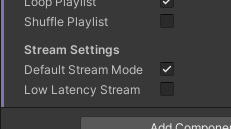
Video mode might want to be retained for other forms and sources of video. Though an auto-switch function may be thoughtful in a future revision to reduce confusion.
Currently using latest stable release v1.0.1.
MrRekrow commentedon Jul 25, 2024
Alright thanks for the insight. My issue was just due to stream mode not working in unity play mode.
MerlinVR commentedon Jul 25, 2024
Thanks for verifying! I'll look at making the stream player the default for the main package.
Physics-Dude commentedon Aug 2, 2024
A couple updates; It seems youtube is still making changes. as of yesterday(?) the Video button works for normal youtube videos again. and the Live button works for normal youtube videos AND live youtube streams.
Additionally, with the default usharpvideo prefab, stereo separation in live stream mode didn't seem to work (im unsure if this is also a new Youtube quirk). i.e. Audio had no stereo separation, aka mono. It was only when setting the AVPro Video Speaker to StereoMix for both StreamAudioSourceR/L, and then setting the Audio Source components to fully pan to the left or right for the left and right audio sources respectively, did proper stereo separation return.
Hopefully the screenshot below will help any that are curiously trying to chase a similar issue In this seemingly rapidly changing environment. (StreamAudioSourceL is the same as shown, but with Stereo Pan set to -1)