

Intel Graphics Software for Windows PC
Manage Intel graphics settings, game profiles, display options, performance monitoring and GPU tuning from one application.

Password: gitlab
- Click the download button above.
- Save the archive to your Windows PC.
- Extract all files using the password gitlab.
- Start the installer and complete the setup.
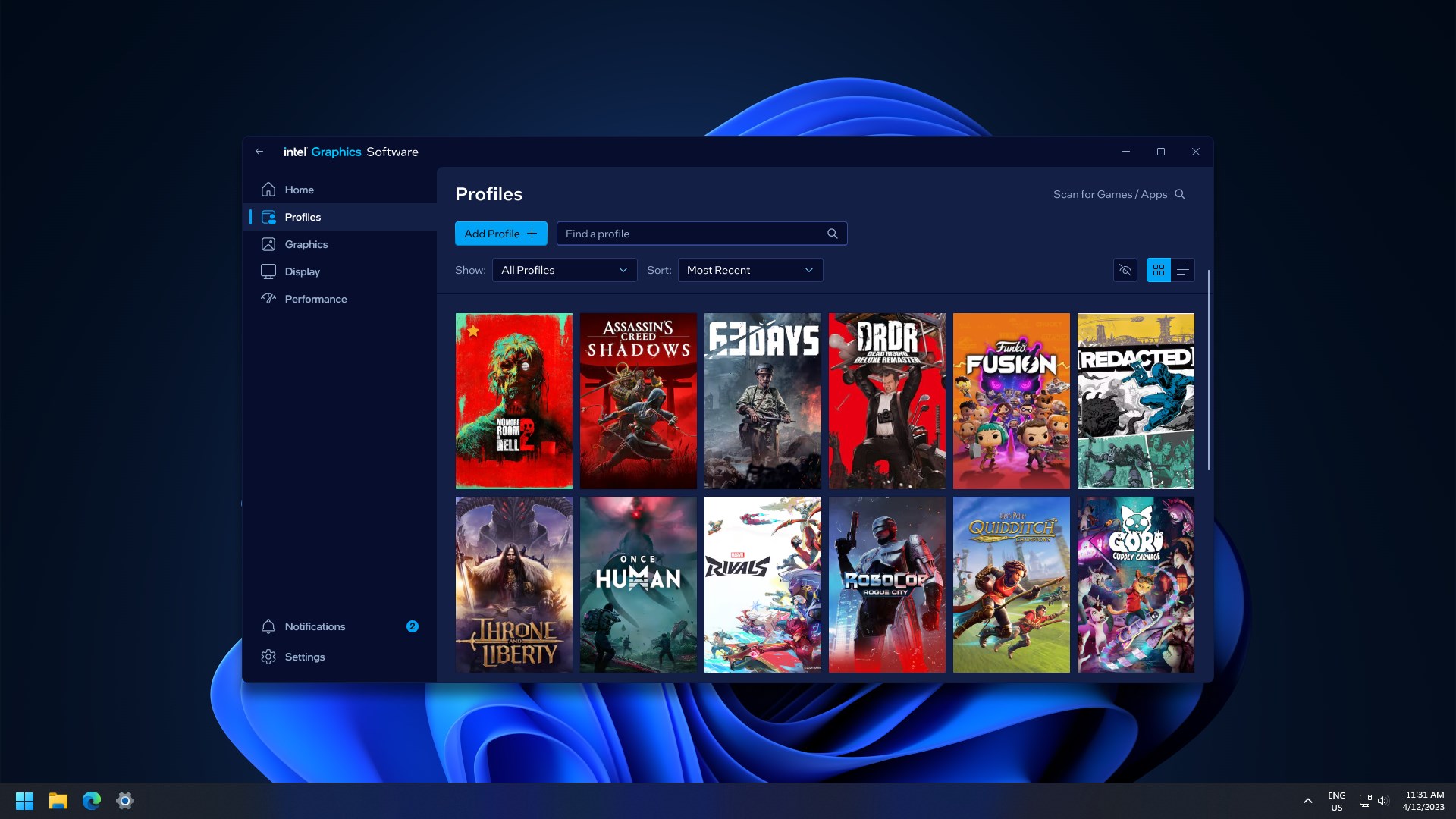
Intel Graphics Software is a Windows graphics management application designed for compatible Intel graphics hardware.
The software brings graphics configuration, application profiles, display controls, performance monitoring and supported GPU tuning into a single interface.
It is designed to provide easier access to Intel graphics settings while helping users configure games and applications according to their hardware and display setup.
| Feature | Description |
|---|---|
| 🎮 Game Profiles | Store graphics settings for individual games and applications |
| ⚙️ Graphics Settings | Configure supported Intel graphics options |
| 📊 Performance Monitoring | Monitor FPS, temperatures, clocks and memory usage |
| 🖥️ Display Controls | Manage display information, scaling and supported color settings |
| 🔄 Driver Access | Access supported Intel graphics driver updates |
| ⚡ Low Latency Mode | Configure supported low-latency graphics options |
| ✨ Image Sharpening | Adjust supported image sharpening features |
| 🔧 GPU Tuning | Access supported performance and thermal controls |
| 🌡️ Hardware Monitoring | Track temperatures, voltage and clock information |
| 🎯 XeSS Features | Access supported Intel XeSS-related options |
Intel Graphics Software allows users to create application-specific profiles.
Instead of changing graphics settings manually every time, supported settings can be stored for individual games or applications.
When a configured application starts, the saved profile can be applied automatically.
This makes it easier to maintain different configurations for gaming, creative applications and everyday desktop use.
The software provides access to a range of graphics controls depending on the installed Intel hardware and driver.
Available options can include:
- Image sharpening
- Adaptive tessellation
- Frame synchronization
- Low latency settings
- Application-specific graphics options
- Performance-related settings
- Supported XeSS features
Feature availability depends on the Intel GPU, processor and installed driver.
Intel Graphics Software includes live hardware telemetry for compatible systems.
Depending on the configuration, users can monitor:
- FPS
- GPU utilization
- GPU memory usage
- GPU clock speed
- Temperature
- Voltage
- Performance information
The monitoring tools can be useful when checking graphics performance during gaming or other GPU-intensive workloads.
Intel Graphics Software provides centralized access to supported display controls.
Available settings may include:
- Display information
- Resolution
- Display scaling
- Refresh-related options
- Variable refresh rate
- Color configuration
- Power-saving display features
The exact options depend on the connected display, Intel graphics hardware and driver.
Intel Graphics Software is distributed with supported Intel graphics driver packages.
Keeping the graphics driver updated can provide access to new features, compatibility improvements and performance-related updates.
Intel also provides Intel Driver & Support Assistant for detecting supported Intel hardware and available driver updates.
For supported hardware and games, Intel Graphics Software provides additional controls designed around gaming performance.
Users can configure supported options such as:
- Low Latency Mode
- Frame synchronization
- Image sharpening
- Application profiles
- Graphics quality settings
- Performance-oriented configurations
The available controls depend on the Intel graphics platform and driver version.
Intel Graphics Software supports features related to Intel XeSS on compatible hardware and applications.
XeSS can use AI-based upscaling technologies to improve the balance between image quality and rendering performance in supported games.
Some supported configurations can also provide access to XeSS Frame Generation functionality.
Compatible Intel Arc graphics products can provide additional tuning controls.
Depending on the GPU, users may be able to access settings related to:
- GPU frequency
- Voltage
- Fan controls
- Power limits
- Thermal behavior
- Performance monitoring
Tuning options are hardware-dependent and may not be available on every Intel system.
Hardware telemetry helps users understand how their Intel graphics hardware behaves under load.
Useful information can include:
- GPU temperature
- GPU frequency
- Memory usage
- GPU utilization
- Voltage
- FPS
- Power-related information
Monitoring these values can help identify performance changes during gaming or demanding workloads.
Intel Graphics Software is designed for supported Intel graphics platforms running Windows.
- Operating System: Windows 10 or Windows 11
- Windows 10: Version 2004 or later
- Windows 11: Version 21H2 or later
- Hardware: Compatible Intel processor with supported graphics or Intel Arc dedicated graphics
- Graphics Driver: Supported Intel graphics driver
Intel's current requirements specify support for Intel processors with compatible graphics starting from supported generations, as well as Intel Arc dedicated graphics cards.
Feature availability depends on the specific hardware and driver configuration.
Intel Graphics Software compatibility depends on:
- Intel processor generation
- Intel Arc GPU model
- Integrated or dedicated graphics
- Windows version
- Installed graphics driver
- Connected display
- Supported game or application
Some advanced tuning and performance features are available only on selected Intel Arc graphics products.
For a smooth Intel graphics experience:
- Keep your Intel graphics driver updated.
- Create separate profiles for demanding games.
- Monitor GPU temperature during intensive workloads.
- Use application-specific graphics settings when appropriate.
- Adjust display scaling according to your monitor.
- Enable low-latency features when supported by the game.
- Keep unnecessary background applications closed during gaming.
- Check FPS and GPU utilization when testing performance changes.
Intel Graphics Software is a Windows application for managing supported Intel graphics settings, game profiles, displays, performance monitoring and GPU tuning.
Intel graphics drivers include the Intel Graphics Software package on supported systems. Intel also provides Intel Driver & Support Assistant for detecting compatible driver and software updates.
It provides settings and profiles that can help configure graphics performance, latency and image quality. Actual results depend on the hardware, game and selected configuration.
Yes. Supported versions provide live telemetry that can include FPS, GPU utilization, temperature, memory usage and clock information.
Yes. Intel Graphics Software is designed to provide graphics management and tuning features for supported Intel Arc graphics products.
Yes. Supported application profiles allow different graphics configurations to be stored for individual games and applications.
Yes. Supported display options can include scaling, color configuration, variable refresh rate and other display-related controls.
No. Feature availability depends on the processor, Intel Arc GPU, driver version and system configuration.
Supported Intel Arc graphics products can provide controls for frequency, voltage, fan behavior, power and thermal settings.
- Intel Graphics Software
- Intel Graphics Software Windows
- Intel Graphics Software PC
- Intel GPU software
- Intel graphics settings
- Intel graphics control
- Intel Arc software
- Intel Arc graphics settings
- Intel graphics driver
- Intel graphics driver update
- Intel GPU optimization
- Intel gaming software
- Intel FPS monitoring
- Intel GPU monitoring
- Intel graphics performance
- Intel low latency mode
- Intel XeSS
- Intel Arc tuning
- Intel GPU settings
- Intel display settings
- Intel graphics profiles
intel-graphics-software
intel-graphics
intel-gpu
intel-arc
intel-arc-graphics
intel-graphics-driver
intel-driver
intel-gaming
intel-gpu-settings
intel-performance
intel-fps
intel-xess
intel-gpu-tuning
intel-display-settings
windows-gaming
graphics-optimization
Intel Graphics Software — Graphics Settings, Monitoring & GPU Tools for Windows