
An asynchronous, modern Telegram bot designed for Chevereto v4.x image and video hosting.
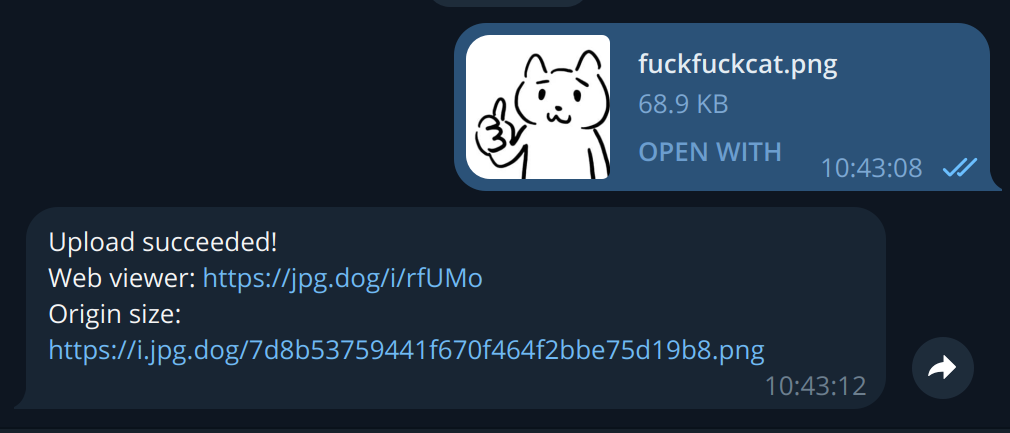
- Chevereto v4.x Full Support: Compatible with API v1.1 using personal user API keys or system keys.
- Personal Account Login: Users can connect their own Chevereto account (
/login <api_key>) with auto-deleting secret messages. - Dynamic Album Management: Logged-in users can view and change their target album on the fly using
/album <id>. - Quality-Preserving Video Uploads: Accepts MP4, WebM, and MOV videos sent via Telegram's uncompressed File/Document method (without Telegram's built-in re-encoding).
- Host Video Capability Detection: Automatically detects whether the remote Chevereto instance has enabled video uploads and FFmpeg.
- Auto-Expiration & NSFW: Optional auto-deletion intervals (e.g.
PT5M,P1D,P1W) and NSFW tagging. - Rich Embed Links & Inline Buttons:
- Instant direct link & web viewer link
- One-tap copy embed codes: Markdown, BBCode, HTML
- Interactive inline keyboard buttons:
[ 🌐 Viewer ],[ 🔗 Direct ],[ 🗑️ Delete ]
- Modern Async Architecture: Built on
python-telegram-botv22+ andhttpx, with zero-leak in-memory streaming. - Cross-Platform: Zero external C/DLL dependencies (works smoothly on Linux, macOS, and Windows).
- Cross-Platform System Monitoring: Admin commands (
/uptime,/storage_status,/system_status) powered bypsutil. - Open by Default with Access Control: Bot is open by default, with optional whitelist support (
ALLOWED_USER_IDS). - Flexible Deployment: Ready for Docker, Docker Compose, systemd, or direct Python execution.
-
Clone the repository:
git clone http://github.com/M1Screw/Chevereto-Telegram-Bot.git cd Chevereto-Telegram-Bot -
Copy the environment template and fill in your credentials:
cp .env.example .env # Edit .env with your favorite editor -
Start the container:
docker compose up -d
-
Prerequisites: Python 3.10+ installed.
-
Clone and setup virtual environment:
git clone http://github.com/M1Screw/Chevereto-Telegram-Bot.git
cd Chevereto-Telegram-Bot
python3 -m venv venv
source venv/bin/activate  # On Windows: .\venv\Scripts\activate
pip install -r requirements.txt
-
Configure:
cp config.ini.new config.ini # Edit config.ini with your Telegram token and Chevereto host/API key -
Run the bot:
python bot.py
-
(Optional) Run as a systemd service (Linux):
sudo cp chevereto-bot.service /etc/systemd/system/
sudo systemctl daemon-reload
sudo systemctl enable --now chevereto-bot
You can configure the bot using either config.ini or environment variables / .env.
[BOT]
MODE = POLLING            # POLLING or WEBHOOK
ACCESS_TOKEN = 123456:ABC-DEF1234ghIkl-zyx57W2v1u123ew11  # Telegram bot token from @BotFather
ADMIN_USER_IDS = 123456789 # Admin Telegram user ID(s), comma-separated
ALLOWED_USER_IDS =         # Optional whitelist of allowed user IDs (leave empty for public)

# Webhook configuration (only needed if MODE = WEBHOOK)
WEBHOOK_LISTEN = 0.0.0.0
WEBHOOK_PORT = 8443
WEBHOOK_URL = https://yourdomain.com
WEBHOOK_SSL = False
WEBHOOK_KEY =
WEBHOOK_CERT =

[HOST]
IMAGE_HOST = https://demo.chevereto.com    # Your Chevereto v4 domain or URL
IMAGE_HOST_API_KEY = your_api_key_here     # User API key or Public API key
IMAGE_HOST_RETURN_FORMAT = json
MAX_FILE_SIZE = 20                        # Max file size in MB (Telegram download limit is 20MB)

# Allowed file formats and MIME types
ALLOWED_FILE_FORMAT = .jpg .jpeg .png .bmp .gif .webp .avif .mp4 .webm .mov
ALLOWED_FILE_MIME = image/jpeg image/png image/bmp image/gif image/webp image/avif video/mp4 video/webm video/quicktime

# Chevereto v4 Options
ALBUM_ID =                                # Optional default album ID (e.g. ZfGd)
CATEGORY_ID =                             # Optional default category ID (numeric)
EXPIRATION =                              # Optional auto-delete interval (e.g. PT5M, P1D, P1W)
NSFW = 0                                  # 0 (Safe) or 1 (NSFW)
ENABLE_VIDEO = True                       # Enable or disable video uploads

[DEBUG]
LOGGING_LEVEL = INFO # DEBUG, INFO, WARNING, ERROR| Command | Permission | Description |
|---|---|---|
/start |
All / Whitelisted | Displays welcome message and command overview |
/help |
All / Whitelisted | Displays supported formats, limits, and server status |
/login <key> |
All / Whitelisted | Link personal Chevereto account using your personal API key |
/logout |
Logged-in | Clear personal API key and session album |
/whoami |
All / Whitelisted | View your active session and album status |
/album |
Logged-in / Admin | Check active target album |
/album <id> |
Logged-in / Admin | Switch target album for your personal account |
/album clear |
Logged-in / Admin | Reset album to personal default stream |
/uptime |
Admin only | Reports system uptime |
/storage_status |
Admin only | Reports disk free, used, and total storage |
/system_status |
Admin only | Full system overview (CPU, memory, disk, uptime) |
/cache_status |
Admin only | Legacy cache directory inspection |
/cache_clean |
Admin only | Cleans legacy cache directory |
The project includes an automated test suite with full Chevereto v4 API mocking:
# Install development dependencies
pip install -r requirements-dev.txt

# Run pytest suite
pytest -v

# Run ruff linter & formatter check
ruff check .
ruff format --check .A GitHub Action automatically runs tests and publishes multi-architecture images (linux/amd64, linux/arm64):
- Development Image (
dev): Triggered on every commit pushed tomain.- GHCR:
ghcr.io/<owner>/chevereto-telegram-bot:dev
- GHCR:
- Release Images (
latest,v*): Triggered whenever a version tag likev2.0.0is pushed.- GHCR:
ghcr.io/<owner>/chevereto-telegram-bot:latest,v2.0.0,2.0,2
- GHCR:
- Optional Docker Hub Publication:
- Automatically enabled if
DOCKERHUB_USERNAMEandDOCKERHUB_TOKENsecrets are configured in GitHub repository settings. - If secrets are not present, Docker Hub publishing is automatically skipped without failing the CI workflow.
- Automatically enabled if
This project is licensed under the terms of the GNU General Public License v3.0 (GPL-3.0). See LICENSE for details.